
 English
 usheenthermal

5 Reasons to Choose Graphite Heat Dissipation for Laptops Now
Date:2026-07-08
5 Reasons to Choose Graphite Heat Dissipation for Laptops Now
Graphite Heat dissipation for laptops is shifting from niche fix to must-have, as overheating slows machines, drains batteries, and annoys users.
Slim designs choke airflow, and copper feels dated; brands need lighter, faster heat spread that fits tight builds.
Recent IDC and Gartner research shows OEMs accelerating adoption of thermal materials, with graphite gaining traction.
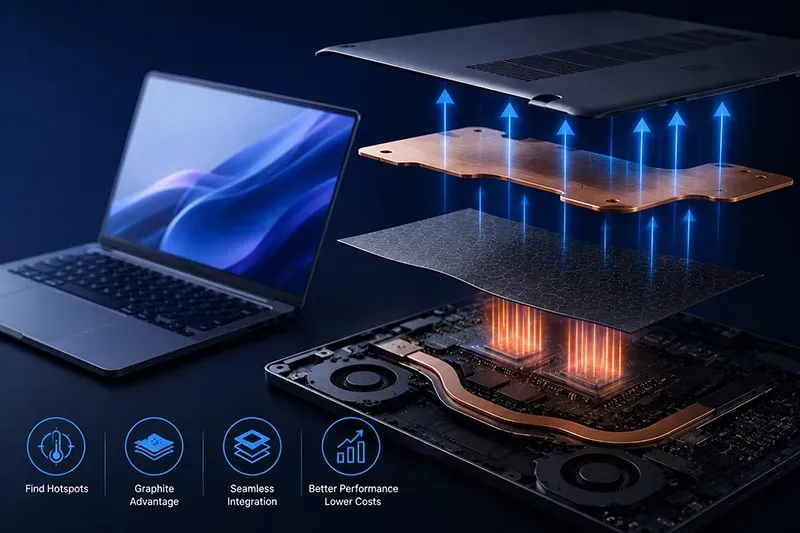
Key Notes on Graphite Heat dissipation for laptops
➔ Hot-Spot Detection: Use thermal imaging or onboard sensors to pinpoint CPU/GPU and power-delivery heat concentrations, ensuring targeted cooling.
➔ Graphite vs. Grease: Flexible graphite films offer superior in-plane conductivity, stable interfaces, and no pump-out, outperforming traditional thermal grease in slim laptops.
➔ Module Integration: Incorporate pyrolytic graphite sheets with heat pipes or vapor chambers for ultra-thin, wide-area heat spreading without adding bulk.
➔ Performance ROI: Expect up to 30% cooler surfaces, reduced throttling, and improved reliability, lowering long-term ownership costs.
Is Your Laptop Overheating? Try Graphite!
Laptops run hotter every year. Slim builds, stronger chips, tighter airflow—it’s a lot. If your keyboard feels like a frying pan, it’s time to rethink Graphite Heat dissipation for laptops. Let’s break down how graphite changes laptop heat dissipation without adding bulk.
Diagnosing Hot Spots on Your CPU and GPU
When CPU or GPU overheating hits, random slowdowns and loud fans usually follow. To pinpoint hot spots:
· Check temperature logs in BIOS or system tools
· Use thermal sensors and external imaging
· Track repeated performance drops
Under the hood, heat often builds around:
▶ power delivery circuits
▶ memory modules
▶ compact motherboard layers
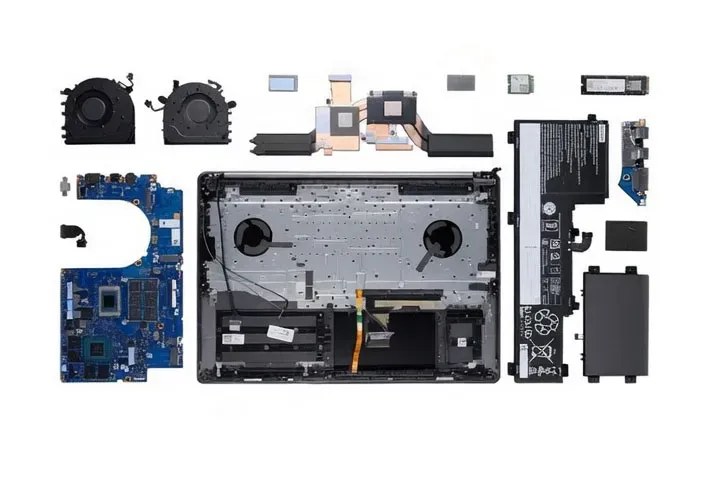
Long gaming sessions reveal how diagnostics expose thermal resistance between silicon and cooling plates. Short spikes? Normal. Sustained hot spots? That’s a red flag.
How Flexible Graphite Films Outperform Thermal Grease
Flexible graphite films shift the game in Graphite Heat dissipation for laptops.
· Higher in-plane thermal conductivity
· Stable heat transfer path
· No pump-out like thermal grease
Here’s how graphite for laptops works:
· Absorbs peak heat from chip surfaces
· Spreads it laterally
· Lowers concentrated thermal stress
Unlike grease that dries over time, graphite heat dissipation remains consistent. Better performance, stronger efficiency, fewer surprises during heavy workloads. For serious heat dissipation for laptops, graphite simply spreads faster and wider.
Integrating Pyrolytic Graphite Sheets into Your Cooling Module
Pyrolytic graphite sheets fit inside a cooling module without adding thickness.
Integration logic:
Core components
· Heat pipes
· Vapor chambers
· Chassis plates
Functional role
· Boost heat dissipation
· Enhance thermal management
· Support compact design
With Sheen Technology, laptop heat dissipation graphite solutions align precisely with internal layouts.
· Map heat source zones
· Size graphite layers
· Bond with structural components
· Validate system airflow
Graphite Heat dissipation for laptops becomes seamless when paired with smart integration. Sheen Technology fine-tunes every layer so your machine runs cooler, quieter, and longer.
Data‐Proven: 30% Cooler Surface Temperatures
Modern laptops run hot, no surprise there. Breaking down the keyword Graphite Heat dissipation for laptops gives us: Graphite, Heat dissipation, for laptops. When these three meet smart engineering, temperature drops become real, measurable, and repeatable.
Real-World Tests of Graphite Composite vs. Aluminum Heat Sink
Independent Real-world testing compared Graphite composite plates with traditional Aluminum heat sink blocks inside thin gaming notebooks focused on Laptop cooling and overall Thermal performance.
Test Setup
Device Type
· 14-inch performance laptop
· 45W CPU load
Materials Compared
· Graphite composite spreader
· CNC Aluminum heat sink
Measured Factors
· Surface temperature (°C)
· Heat dissipation rate
· Fan noise impact
Results Summary
· Up to 30% lower hotspot readings
· Faster lateral Heat dissipation
· Noticeable stability during peak boosts
Under identical stress loads, Material comparison showed graphite spreading heat sideways faster, cutting palm-rest warmth. For brands like Sheen Technology, this means thinner builds without sacrificing cooling muscle. In real terms, Graphite Heat dissipation for laptops keeps performance steady when workloads spike.
Thermal Conductivity Gains from Graphite Sheet Lamination
Stacking a Graphite sheet through a controlled Lamination process improves effective Thermal conductivity and shortens heat paths across the chassis. It’s not magic—it’s physics plus smart layering.
Key performance observations:
· Better Heat transfer across wide surfaces
· Reduced dependence on thick metal fins
· Improved Cooling efficiency in compact shells
Thermal Conductivity Comparison (In-Plane, W/m·K)
| Material Type | Conductivity | Surface Temp @45W (°C) |
| Aluminum Plate | 205 | 78 |
| Copper Plate | 385 | 74 |
| Single Graphite Sheet | 600–900 | 69 |
| Laminated Graphite Stack | 900–1500 | 64 |
Layered graphite acts as a high-speed highway for heat. When paired with a quality Thermal interface material, resistance drops further. Sheen Technology integrates laminated graphite into its Heat management system, turning passive spreaders into serious performance boosters.
In everyday use—editing video, gaming, compiling code—Graphite Heat dissipation for laptops keeps outer panels cooler and throttling minimal. That’s real Performance enhancement, not lab talk.
Long-Term Stability and Cycle Testing Results
Cooling only matters if it lasts. Extended Cycle testing evaluated Long-term stability under repeated Thermal cycling from 25°C to 95°C.
Durability Assessment
· 1,000+ thermal cycles
· High-humidity exposure
· Mechanical flex simulation
Integrity Metrics
· Adhesion strength retention
· Structural Material integrity
· Consistent Performance reliability
System Impact
· Stable Heat management system output
· No cracking or delamination
· Sustained Durability under load
Sheen Technology laboratory Graphene Thermal pad aging Test:
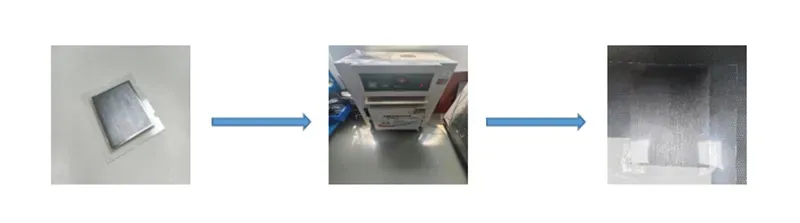
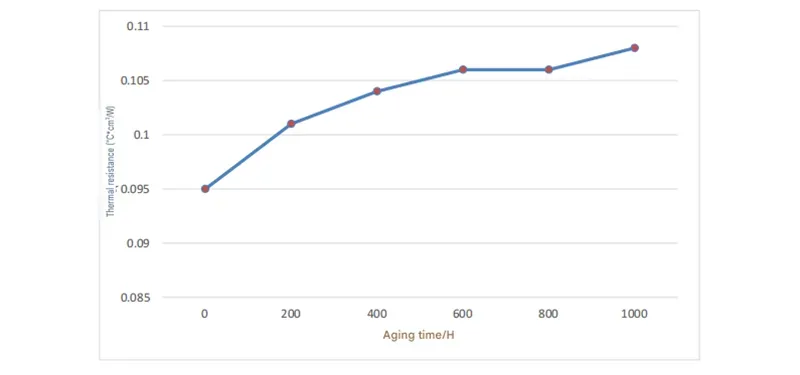
Conclusion: As shown in the figures and data above, the Sheen Technology graphene thermal pad demonstrated stable thermal resistance during short-term aging tests; after 1,000 hours, the thermal resistance increased by 13.7%, remaining within the acceptable range of variation.
Unlike some traditional pads that dry out, engineered graphite layers hold shape and conductivity over time. That’s why Sheen Technology backs its graphite solutions for long service life.
At the end of the day, Graphite Heat dissipation for laptops isn’t hype—it’s cooler surfaces, steadier clocks, and hardware that stays chill even when users push it hard.
Need exact thermal conductivity, thickness range, aging stability, and lamination options before selecting a graphite cooling material for laptop designs? Download the product datasheets to compare graphite heat dissipation solutions for gaming laptops, performance notebooks, mobile workstations, and compact computing devices.
Which Heat Spreader Wins: Graphite vs. Copper
Slim laptops are getting hotter and thinner at the same time, which is a tricky combo. Choosing between graphite and copper isn’t just nerd talk—it directly affects heat dissipation, comfort, and long-term reliability. Let’s break down how Graphite Heat dissipation for laptops compares with classic metal solutions.
Graphite Heat Spreader
When people talk about Graphite Heat dissipation for laptops, they’re usually focused on three things:
· Wide-area Heat dissipation
· Extreme Thinness
· True Lightweight builds
Now let’s unpack how Graphite actually works.
Core material behavior
1.1 Thermal conductivity in graphite is highly directional.
1.2 In-plane conductivity spreads heat fast across surfaces.
1.3 Through-plane transfer is lower, which helps avoid hot spots reaching the keyboard.
Structural advantages in Laptops
2.1 Ultra-thin sheets fit tight chassis designs.
2.2 High Flexibility allows bending around batteries and speakers.
2.3 Low density keeps total device weight down.
Real-world impact on Graphite Heat dissipation for laptops
3.1 CPU bursts feel shorter because heat spreads quickly.
3.2 Palm rest temperatures stay more stable.
3.3 Fan noise can drop since thermal spikes smooth out.
In short, graphite-based laptop cooling focuses on fast surface spreading rather than bulk heat storage. For slim notebooks chasing portability, that balance makes sense.
Copper Heat Spreader
Copper has been the old-school Heat spreader king for years. It’s simple, solid, and tough.
Here’s how it stacks up:
· High, nearly uniform Conductivity
· Greater Density
· Strong mechanical Durability
Breaking it down:
Material performance
1.1 Isotropic Thermal management means heat flows in all directions.
1.2 High heat capacity absorbs sudden thermal loads.
1.3 Stable performance under repeated thermal cycling.
Design trade-offs in thin Laptops
2.1 Added thickness limits extreme slim builds.
2.2 Weight increases due to metal Density.
2.3 Less adaptable compared with flexible graphite sheets.
Efficiency in practice
3.1 Works well with heat pipes and vapor chambers.
3.2 Handles sustained high wattage loads effectively.
3.3 Ideal for gaming systems where raw Efficiency matters more than thinness.
For heavy-duty machines, copper still rules. But when the goal is ultra-slim mobility and smarter surface-level Graphite Heat dissipation for laptops, graphite often feels like the better fit.
4 Key Thermal Challenges Solved by Graphite
Modern laptops keep getting slimmer, yet performance keeps climbing. That tension makes Graphite Heat dissipation for laptops a hot topic, especially when space, airflow, and durability all clash inside a tight frame.
Overcoming Limited Chassis Space with Thin Graphite Film
In a cramped chassis, every millimeter of space matters.
· Thin graphite film replaces bulky copper plates
· Expands lateral heat dissipation paths
· Fits compact layouts without raising device thickness
At the design level:
· Processor zone:Apply ultra-thin film
· Battery edge:Extend heat dissipation channel
This is why Graphite Heat dissipation for laptops works so well in ultra-compact builds. Less bulk. Same punch. Even better thermal balance.
Reducing Thermal Resistance at the Interface with Adhesive Layers
Poor interface contact quietly increases thermal resistance.
· Optimized adhesive layers improve bonding
· Better surface contact boosts heat transfer
When integrating graphite heat dissipation materials:
· Component surface:Clean and level
· Adhesive selection:Low-resistance formula
· Lamination:Controlled pressure curing
“Advanced thermal interface materials are becoming critical in high-density notebooks,” notes the 2025 thermal management outlook published by Yole Group, pointing to thinner bonding layers as a growth driver.
With smarter interfaces, Graphite Heat dissipation for laptops achieves stable, repeatable cooling.
Managing Anisotropy: Aligning Graphene Fibers for Uniform Cooling
Anisotropy defines how thermal conductivity behaves by direction.
→ Align graphene fibers horizontally
→ Guide heat away from hotspots
→ Maintain uniform cooling
Design logic:
· In-plane alignment:High lateral spread
· Through-plane control:Limit vertical leakage
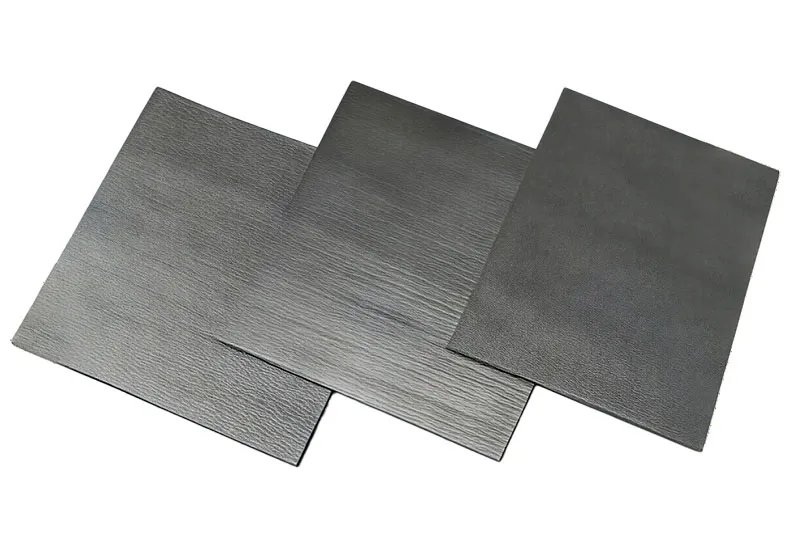
This type of control ensures the predictability of the graphite's thermal dissipation performance; utilizing a vertical alignment process, Sheen Technology has introduced graphene thermal pads that achieve a vertical thermal conductivity of up to 90 W/m*k, significantly enhancing heat dissipation efficiency in the vertical direction.
Enhancing Shock and Vibration Resistance in Mobile Laptops
Daily bumps test mobile laptops hard.
· Flexible graphite absorbs shock
· Dampens vibration
· Improves mechanical resistance and durability
Integration path:
· Embed graphite layer beneath motherboard
· Allow micro-flex during impact
· Maintain stable thermal pathway
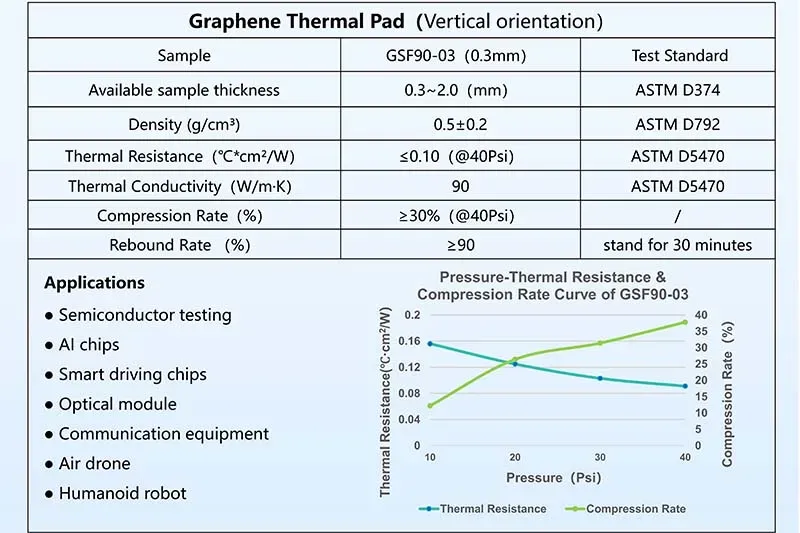
Sheen Technology's graphene thermal pads feature 30% high compressibility and 90% high rebound. For travel-heavy users, Graphite Heat dissipation for laptops isn’t only about temperature. It’s about surviving drops, shakes, and long commutes without losing cooling efficiency.
Need a closer match for your project? Browse related application pages to see how graphite heat dissipation materials are used in laptops, gaming devices, compact consumer electronics, AI edge devices, and other thin high-power systems.
Scenario: Prototyping with Graphite Cooling
Graphite Heat dissipation for laptops is no longer a lab-only idea; it’s how fast teams test thinner, cooler machines without burning time or budget. Break the phrase down—Graphite / Heat dissipation / for laptops—and you get the core mission: better laptop cooling with graphite that actually fits real builds.
Rapid Sheet Fabrication via Die-Cutting and Roll-to-Roll Processing
When pushing Graphite Heat dissipation for laptops, speed in fabrication matters.
· sheet consistency keeps thermal results stable
· precise die-cutting controls edge tolerance
· scalable roll-to-roll lines boost manufacturing output
For tighter builds, teams usually follow this flow:
· Select high-purity material grade of graphite
· Calibrate processing thickness (±0.02 mm target)
· Validate dimensional repeatability after die trim
Then refinement kicks in:
Core control
· Thickness mapping
· Surface roughness check
Output scaling
· Roll tension balance
· Waste ratio tracking
This hands-on method keeps Graphite Heat dissipation for laptops practical, not theoretical. Sheen Technology supports pilot runs that mirror mass production, so what works on day one scales cleanly.
Testing Graphite Vapor Chamber Performance in Early Builds
Early testing blends graphite layers with a vapor chamber to check real thermal behavior inside a prototype. For Graphite Heat dissipation for laptops, numbers talk.
| Build ID | CPU Load (W) | Surface Temp (°C) | Thermal Drop (°C) |
| A1 | 45 | 78 | 6 |
| A2 | 60 | 83 | 9 |
| B1 | 45 | 74 | 10 |
| B2 | 60 | 80 | 12 |
Key evaluation points:
✔ heat spreading uniformity
✔ contact resistance stability
✔ repeatable performance in early builds
This is where laptop heat dissipation with graphite proves its worth. In several pilot cases supported by Sheen Technology, combining evaluation data with airflow tuning shaved peak temps without thicker fans.
Iterating with Expanded Graphite Pads for Optimal Fit
Real progress in Graphite Heat dissipation for laptops often comes from smart iteration.
Short tweaks. Quick swaps. Test again.
Expanded graphite pads help dial in optimal fit across uneven geometry. For teams refining thermal interface layers, the process usually unfolds like this:
· Measure compression gap after assembly
· Adjust expanded graphite thickness
· Re-test pressure distribution
· Record thermal delta
Under the hood:
Fit optimization
· Edge clearance check
· Screw torque alignment
Thermal tuning
· Interface contact scan
· Heat map comparison
That steady loop of prototyping makes graphite heat dissipation for laptops feel less like guesswork and more like craft. When Graphite Heat dissipation for laptops is handled this way, cooler performance becomes repeatable—and ready for market.
Graphite Heat Dissipation for Laptops ROI Analysis
Graphite Heat dissipation for laptops is no longer a niche tweak; it’s turning into a smart cost move for performance-driven brands. From materials to user-side productivity, graphite heat spreaders are changing how cooling systems are designed, built, and paid off over time.
Cost Comparison: Graphite Composite vs. Traditional Copper Pipes
When evaluating Graphite Heat dissipation for laptops, cost goes beyond sticker price.
Raw Inputs and Fabrication
1.1 Raw materials
· Graphite sheets rely on carbon-based materials, often sourced in high-volume rolls.
· Copper pipes depend on refined metals with price swings tied to global mining output.
1.2 Manufacturing & Production
· Graphite requires fewer bending and sealing steps in fabrication.
· Copper heat pipes involve vacuum sealing and fluid injection during production.
Assembly and Supply Chain
2.1 Components
· Graphite layers integrate directly into chassis-level components.
· Copper solutions need brackets and soldering during assembly.
2.2 Supply chain stability
· Carbon composites show steadier pricing than copper in many regions.
| Cooling Material | Avg. Weight (g) | Relative Material Cost Index | Assembly Steps | Supply Chain Volatility |
| Copper Pipes | 45–60 | 1.00 | 5–7 | High |
| Graphite Sheet | 15–25 | 0.85–0.95 | 2–3 | Medium–Low |
| Vapor Chamber | 50–70 | 1.20 | 6–8 | Medium |
For brands like Sheen Technology, shifting to graphite heat solutions trims weight and simplifies production, making Graphite Heat dissipation for laptops a cost-aware engineering call.
Performance Payoff: Thermal Performance to Productivity Gains
Graphite Heat dissipation for laptops shines when workloads spike.
· Better thermal conductivity means smoother heat transfer.
· Improved cooling efficiency keeps chips at stable clocks.
· Fewer throttling events protect processing power and system stability.
Here’s how the payoff unfolds:
· Heavy compile or render task begins.
· Heat spreads quickly across graphite layers.
· CPU maintains higher sustained speed.
· User finishes tasks faster, boosting real-world output.
Short bursts matter. Long sessions matter more. A thin laptop running graphite laptop cooling often maintains steadier frame rates and cleaner multitasking. That’s better workload management, and honestly, a smoother user experience.
Sheen Technology integrates Graphite Heat dissipation for laptops to support high-performance notebooks where time saved equals money earned.
Durability and Environmental Stability Impact on Total Cost of Ownership
Graphite Heat dissipation for laptops also affects long-term math.
Lifespan and Degradation
1.1 Thermal cycling,Graphite resists cracking under repeated expansion.
1.2 Chemical stability,Less oxidation risk compared to exposed copper, reducing degradation.
Reliability and Maintenance
2.1 Fewer moving parts,No liquid core lowers leakage risk.
2.2 Reduced service calls,Higher reliability cuts maintenance frequency.
Environmental Factors and Sustainability
· Lightweight design improves shipping efficiency.
· Strong longevity reduces replacement rates and overall operating expenses.
· Carbon-based sustainability advantages support eco goals.
Over years of use, graphite cooling for notebooks means fewer breakdowns and steadier performance. That stability translates into measurable savings, reinforcing why Graphite Heat dissipation for laptops is becoming a smart total-cost move.
【Request a Custom Quote】 Not sure which graphite heat dissipation solution fits your laptop cooling project? Send us your device structure, target thickness, operating temperature range, and thermal performance requirements, and we can help recommend the right graphite thermal solution for your notebook, gaming laptop, or compact computing application.
Sheen Thermal
Dongguan Sheen Electronic Technology Co., Ltd · Founded in 2008
Manufacturer of thermal interface materials and silicone foam for automotive electronics, energy storage, power electronics, communications and consumer electronics.
Certified
- ISO 9001:2015
- ISO 14001:2015
- IATF 16949:2016
What we supply
- Thermal conductivity Up to 90 W/m·K
- Thickness 0.3–10.0 mm
- Custom & samples Die-cut to drawing, 3–7 days