
 English
 usheenthermal

Unlock Better Cooling Efficiency With an Ultra-Soft Thermal Pad
Date:2026-05-22
Unlock Better Cooling Efficiency With an Ultra-Soft Thermal Pad
Your heatsink may be solid, yet components run hot when air gaps sneak in. An Ultra-Soft Thermal Pad compresses into rough, warped surfaces at normal clamp loads, boosting real contact.
That drop in thermal impedance can trim temperatures, calm throttling, and keep contact steady through cycling—without a heatsink redesign or drama on the line.
Can Ultra-Soft Pad Boost Your Cooling?
A lot of “cooling problems” are really contact problems. This cluster breaks down how an Ultra-Soft Thermal Pad—soft thermal pad material with real-world squish—can tighten up heat transfer and ease thermal stress.
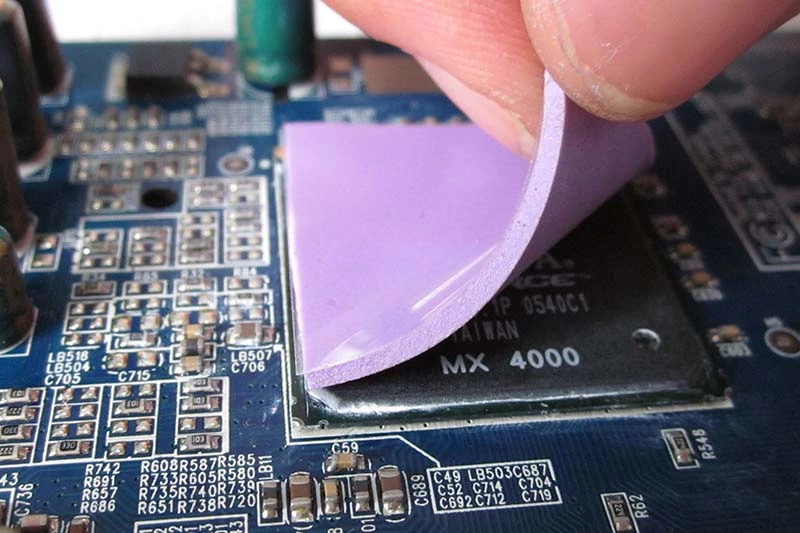
How compressibility and conformability improve thermal management
When an Ultra-Soft Thermal Pad has high compressibility and real conformability, it stops acting like a spacer and starts acting like a true interface material for thermal management.
Contact reality check
· Rough heat sinks/ICs create air pockets; air is the enemy of cooling efficiency.
· Better gap filling raises real contact area, cutting thermal resistance and thermal impedance under controlled clamp load.
What “ultra-soft” changes
· Less assembly drama: lower pressure still yields solid wet-out at the interface.
· With Sheen Technology options, softness is tuned so the pad deforms without tearing, keeping heat transfer steady.
Quick spec cues
· Softer thermal interface material tends to handle height variation better.
· Don’t ignore rebound; a pad that springs back helps hold contact after shocks.
Can a polymer matrix pad outperform ceramic fillers in heat transfer?
Sometimes, yes—because system performance comparison isn’t just about bulk thermal conductivity on paper. A polymer matrix pad can win by lowering interface loss.
Where rigid, ceramic-heavy pads stumble
· High loading of ceramic fillers can raise stiffness.
· Stiff pads don’t conform, leaving micro-voids that punish heat transfer.
Why a composite pad can surprise you
· In well-designed composite materials, filler pathways still carry heat, while the matrix stays soft enough to seal surface roughness.
· That can drop interface resistance so much that total stack performance beats a “higher k” but poorly seated pad.
Practical takeaway
· If your surfaces are uneven, choose a softer thermal interface material even if the datasheet k looks modest.
· Use an Ultra-Soft Thermal Pad when contact quality is the bottleneck, not the heatsink mass.
Addressing high operating temperatures with ultra-soft density
High operating temperatures don’t just heat parts up; they also beat up interfaces. An Ultra-Soft Thermal Pad with ultra-soft density can help keep contact through cycling, which matters for reliability.
Thermal cycling pain points
· Expansion and contraction can cause pump-out, lift-off, and rising thermal performance losses.
· Softer thermal pads reduce stress on microprocessors and MOSFETs, easing thermal stress at the joint.
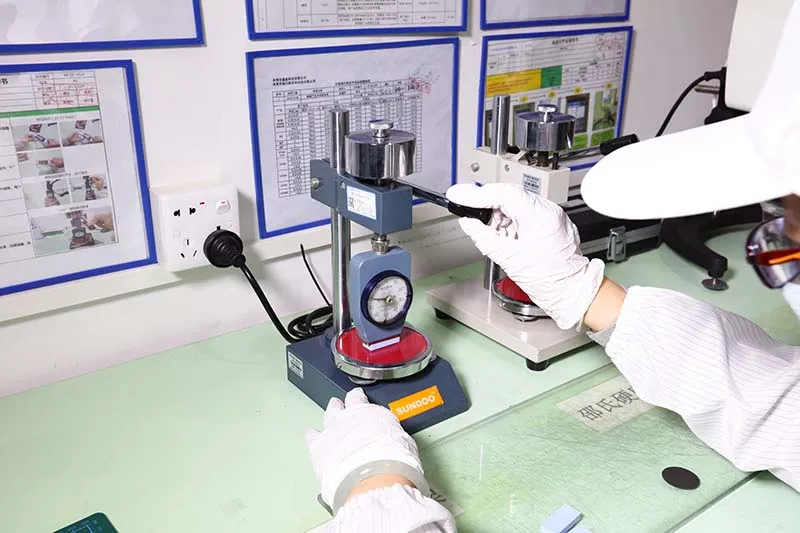
Picking the right softness for heat
· Look for a temperature rating comfortably above your real peak to avoid softening, oil bleed, or slump that hurts temperature control.
· Balance: too soft at too hot can drift; firm enough to stay put, soft enough to seal.
Build habits that actually help
· Check pressure limits so the pad doesn’t over-compress.
· If you’re speccing from Sheen Technology, match pad thickness to tolerance stack so heat dissipation stays consistent over time.
Data Proves: Thermal Pads Cut Temps By 15%
You can argue materials all day, but temperature measurement doesn’t care. Below are two down-to-earth checks—one on CPU cooling, one on LED modules—showing how an Ultra-Soft Thermal Pad can shave heat when surfaces don’t mate perfectly.
Real-world test: thermal impedance comparison in CPU cooling
In real-world testing, thermal impedance is the scorecard: watts in, degrees out, same fan curve, no drama. An Ultra-Soft Thermal Pad helps heat transfer because it squishes into tiny machining marks that would otherwise trap air, and air is the worst “thermal interface material” you’ll ever use.
Test setup (performance comparison)
Control points
· Fixed CPU package power (e.g., 120 W)
· Fixed airflow across the heat sink
· Same mounting pressure each run
Readouts
· CPU hot-spot and sink base temperature measurement (steady-state)
What changes when you add an Ultra-Soft Thermal Pad
Contact reality
· Less micro-gap volume, less pumping, fewer “dry” corners
Metric outcome
· Lower CPU-to-heat sink thermal impedance at the same watts
| Condition | CPU Power (W) | Steady CPU Temp (°C) |
| No interface (air gaps) | 120 | 80 |
| Ultra-Soft Thermal Pad | 120 | 68 |
| Ultra-Soft Thermal Pad (optimized compression) | 120 | 66 |
If you’re speccing parts for a build, Sheen Technology typically frames this as a practical win: use the Ultra-Soft Thermal Pad when flatness isn’t perfect, and let pressure do its job.
Need exact thermal conductivity, thickness range, compressibility, and compliance details before you choose? Download the product datasheets to compare ultra-soft thermal pad options for your build.
Power electronics case study: heat dissipation gains in LED modules
LED housings look flat until you torque them down and the PCB flexes a bit; that’s where power electronics reality shows up. A Thermal Pad—especially an Ultra-Soft Thermal Pad—acts like a quiet mediator between the metal shell and board, improving thermal management without cranking screws until something bows.
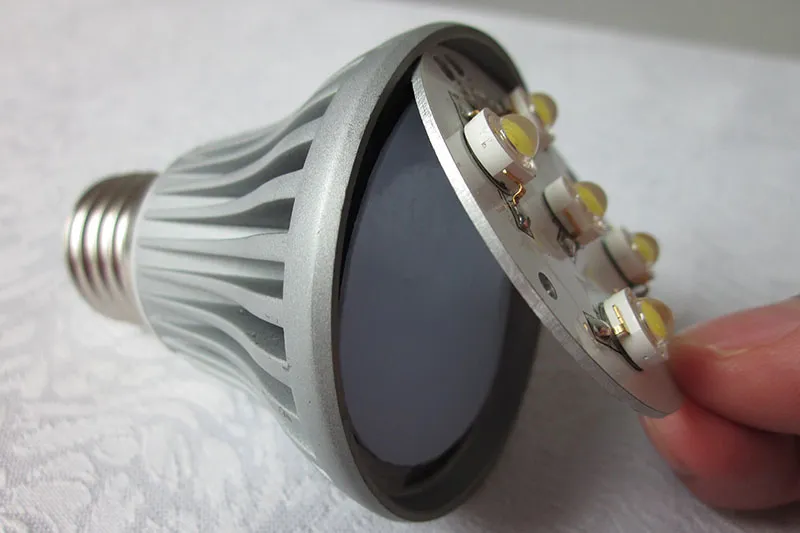
Quick checks that keep the case study honest:
· Pick pad thickness to bridge the gap, not to “jack up” the board.
· Confirm compression spread with a simple torque map.
· Track LED junction temperature because it’s tied to device reliability.
A simple workflow that works in the shop:
· Measure worst-case housing-to-PCB gap at multiple corners.
· Choose a thermal pad thickness that reaches contact at target compression.
· Run at rated current, log heat dissipation behavior via junction-temp estimate.
· Re-check for PCB bowing; if it’s bending, back off thickness or hardness.
Sheen Technology usually recommends treating thermal conductivity as only half the story; the other half is fit. When the pad conforms, LED modules run cooler, and that keeps light output steadier over time.
4 Key Factors For Optimal Heat Dissipation
Picking a thermal pad isn’t just “grab the squishy one.” If you want cooler heat flow without weird hotspots, you need a pad that fits real-world surface irregularities, mounts clean, and won’t cause contamination later—especially in tight CPU/GPU builds.
Compressibility and gap filling properties
When compressibility is right, gap filling stops being a gamble and starts being predictable, even with messy tolerance stack-ups across boards and brackets.
Where the trouble usually hides
· Surface irregularities on lids, contact faces, and stamped shields
· Uneven standoffs that change pressure corner to corner
· Tiny voids around VRMs that trap air and wreck thermal transfer
What to match (softness vs. thickness)
· Thicker pad: better conformability, but risk of bowing if pressure is high
· Softer pad: better wetting on rough faces, but can “pump” if over-squeezed
· Ultra-Soft Thermal Pad choices work best when thickness is picked to close gaps, not “just because”
Quick numeric check (typical targets)
| Gap to bridge (mm) | Suggested pad thickness (mm) | Suggested compression (%) |
| 0.20 | 0.50 | 20 |
| 0.50 | 1.00 | 25 |
| 1.00 | 2.00 | 30 |
Using a thermal interface material like an Ultra-Soft Thermal Pad from Sheen Technology helps the pad settle into micro-roughness fast, so the contact area grows instead of leaving sneaky air pockets.
High thermal conductivity vs. low thermal resistance
People love chasing thermal conductivity numbers, but the real win is low thermal resistance across the whole interface.
A simple way to think about it
· High k helps heat transfer, sure
· But if the pad doesn’t fully wet out, the temperature gradient spikes and efficiency tanks
· Start with the pad’s fit: if the interface is wavy, k won’t save it.
· Push for thin, even bondlines: minimal thickness under controlled pressure beats a thick pad with great k.
· Watch the assembly: uneven load creates uneven heat flow, which shows up as throttling on a CPU/GPU.
If you’re swapping materials, compare “system” performance: Ultra-Soft Thermal Pad behavior under compression often beats a stiffer high-k sheet because the real limiter is contact quality, not brochure math. For quick shopping talk, “Ultra Soft pad” and “thermal pad” options should be judged by measured °C drop at the same clamp force.
Integration with heat sinks and microprocessors
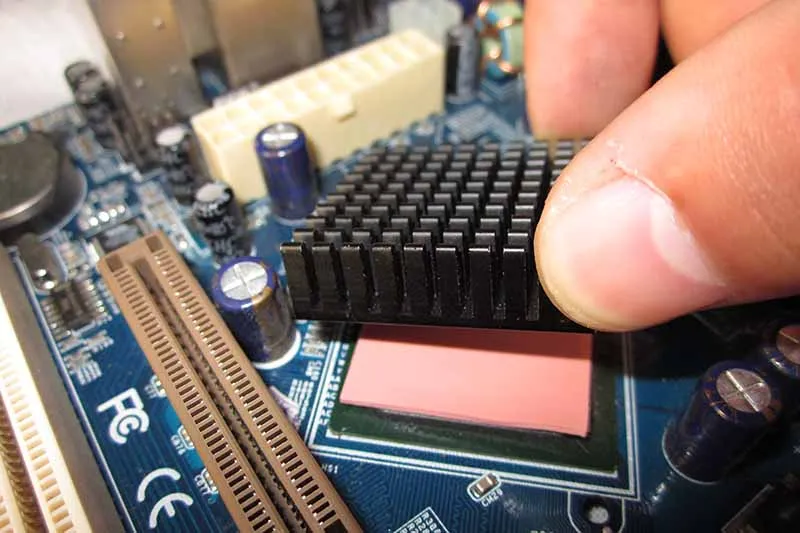
Pads don’t run the show alone; the integration with heat sinks and microprocessors decides if your cooling is clean or chaotic.
Mechanical alignment stuff that bites back
· Heat sink flatness: a slight warp can lift corners and create voids
· Mounting pattern: diagonal torque matters for even pressure
· Die-cut accuracy: pad shift reduces contact on the hot zone
Build checklist for real assemblies
· CPU/GPU hotspot map: place the pad where the heat actually is, not just centered “by vibe”
· Cooling system stack: pad → sink → screws/springs must land at the intended compression
· Avoid extremes: over-compression can stress electronic components, under-compression leaves air
Sheen Technology typically specs Ultra-Soft Thermal Pad formats that die-cut neatly, which makes repeatable placement easier on the line and less fussy during rework.
Silicone-based vs. non-silicone material compositions
Material choice affects long-term stability, handling, and even nearby optics or sensors.
Silicone options (common elastomer route)
· Silicone elastomers handle heat well and keep softness over time
· Risk points: outgassing and oil bleed can fog lenses or contaminate contacts, hurting reliability
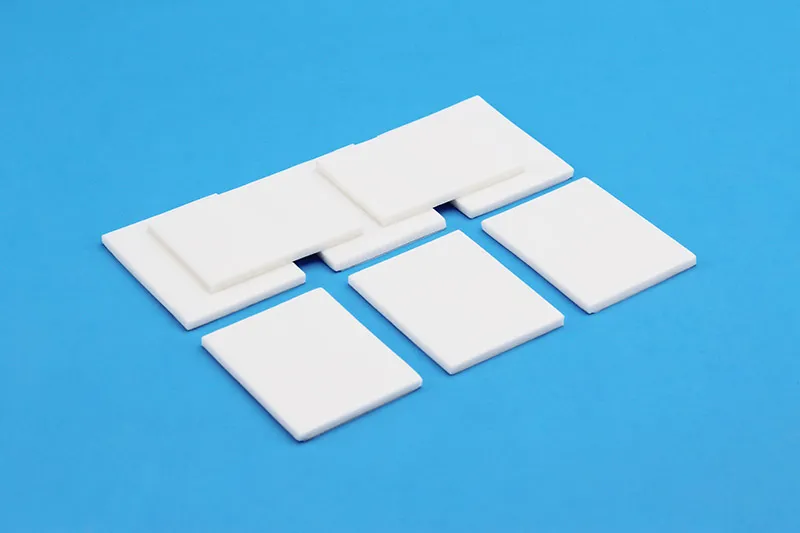
Non-silicone options (when cleanliness rules)
· Non-silicone polymers reduce contamination risk in tighter enclosures
· Some material compositions add reinforcement for easier pick-and-place and fewer tears during assembly
Practical pick logic
· If contamination is a hard “no,” start non-silicone
· If temperature cycling is brutal, silicone can be safer—just manage outgassing with the right spec and validation
For many builds, an Ultra-Soft Thermal Pad in a low-bleed formulation lands the sweet spot: solid thermal performance, less mess, and smoother handling—especially when the thermal pads must sit close to sensitive parts.
Need a closer match for your project? Browse these related application pages to see where ultra-soft thermal pads are used in real production environments.
Ultra-Soft Pad In Server Rack Scenarios
Server racks run hot, tight, and busy, so the interface material can’t be fussy. This cluster stays practical: Ultra-Soft Thermal Pad choices that fit rack life, meet safety rules, and speed up assembly. Sheen Technology keeps the thermal pad details clean and build-friendly.
Sheet material form factor for telecom equipment
When telecom equipment uses big mating faces, sheet material (or roll stock) is the easy win; an Ultra-Soft Thermal Pad lays down flat, then stays put. That helps thermal management feel repeatable on the line, not like a one-off hack.
Material choices for the right form factor
· Sheets for wide covers, shields, and backplates
· Stable thickness supports steady heat dissipation and cooling efficiency
Roll stock for high-volume electronics builds
· Cleaner handling cuts wrinkles that bump up interface resistance
Interface planning around hotspots
· Map contact zones on heat sources
· Use thermal pad coverage to smooth pressure variation
Control stack-up
· Consistent compression keeps thermal management predictable
Part callouts that stop rework
· Specify “Ultra-Soft Thermal Pad sheet” in the BOM
· Note thickness, tack, and service temp for rack duty (Sheen Technology can support that)
Ensuring RoHS compliance and flame retardancy
Rack density means “small issue” can turn into “big smoke” fast, so paperwork matters as much as softness. Ask for RoHS compliance and align it with environmental regulations like REACH; don’t accept vague claims when product safety is on the line.
· Confirm material properties on the exact thermal pad grade, not a family brochure.
· Request flame retardancy details that match your build plan.
· UL needs vary by program, so push for the right certificate instead of a random label.
· Tie it to safety standards in your spec package, then keep QC records handy.
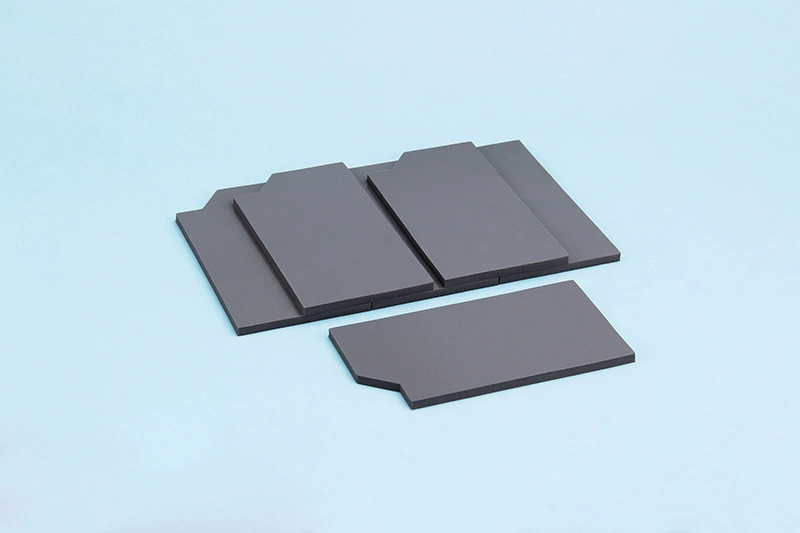
Sheen Thermal pad UL 90 Flame test records
| Sample: | Thermal Pad | ||
| Thickness: | 3.0mm | Colo: | Grey |
| Ambient Temp: | 23.5℃ | Humidity: | 50 %RH |
Materials classifications:
| Criteria conditions | V-0 | V-1 | V-2 |
| After flame time for each individual specimen t1 or t2 | ≤10s | ≤30s | ≤30s |
| Total after flame time for any condition set (t1 plus t2 for the 5 specimens | ≤50s | ≤250s | ≤250s |
| After flame plus afterglow time for each Individual specimen after the second flame application (t2 +t3 ) | ≤30s | ≤60s | ≤60s |
| After flame or afterglow of any specimen up to the holding clamp | No | No | No |
| Cotton indicator ignited by flaming particles or drops | No | No | Yes |
| No. | t1(s) | t2(s) | t3(s) | All sample t1+t2≤50S | Single sample t2+t3≤30S | Does it light the cotton | Whether the burnt out | Level of compliance |
| 1 | 0.9 | 0.8 | 0.2 | Meet | Meet | No | No | V-0 |
| 2 | 0.8 | 0.6 | 0.2 | No | No | |||
| 3 | 0.8 | 0.5 | 0.2 | No | No | |||
| 4 | 0.8 | 0.6 | 0.2 | No | No | |||
| 5 | 0.7 | 0.5 | 0.2 | No | No |
Quick gut-check: if a vendor can’t show traceable compliance, that “Ultra Soft” pad is a headache waiting to happen.
Sheen Technology typically positions an Ultra-Soft Thermal Pad option with compliance docs ready, so procurement doesn’t get stuck in email ping-pong.
Custom shapes for efficient server module assembly
In a server module, speed is king, but sloppy placement kills cooling efficiency. A die-cut Ultra-Soft Thermal Pad with clean edges drops into place fast, clears standoffs, and keeps contact pressure even.
Fit-to-build shaping
· Custom shapes tuned to your keep-out zones:Cutouts avoid fasteners and tall parts, boosting integration
· Edge control for alignment:Better placement reduces skew that raises thermal resistance on the thermal interface
Assembly flow that stays smooth
· Pre-cut parts reduce trimming at the bench:Less handling keeps surfaces clean for real thermal management
· Kitting options:One pad per module bag limits mix-ups during assembly
Design flexibility without drama
· Prototype quickly, then lock the die
· Helps dial in cooling efficiency before volume ramps (Sheen Technology can support these die-cut iterations)
For teams bouncing between pad sheet trials and final cut parts, calling it out clearly—Ultra-Soft Thermal Pad, Ultra Soft pad, or ultra-soft thermal pad—keeps everyone on the same page without overthinking it.
FAQs about Ultra-Soft Thermal Pad
How does an Ultra-Soft Thermal Pad reduce thermal resistance on rough heat sinks and ICs?
Rough heat sinks and slightly warped integrated circuits leave tiny caves of trapped air—where heat dissipation goes to struggle. An Ultra-Soft Thermal Pad answers with softness, compressibility, and conformability, pressing into those voids for tighter gap filling and a calmer thermal path.
· Result: higher real contact area → lower thermal resistance and thermal impedance at the same assembly pressure
· Practical win: thickness stays more predictable across batches, helping thermal management stay repeatable in assembly processes
How do you select thickness and compressibility for telecom equipment or server modules?
In telecom equipment and server modules, the gap you think you have is rarely the gap you build. Stack-ups, frames, and tolerance drift can turn a “safe” pad into a board-bender. Pick thickness with the end-state in mind: the compressed bondline, not the catalog number.
1) Measure the gap range across chipsets, voltage regulators, and MOSFETs to the heat sinks
2) Choose a thickness that reaches a thin bondline under your allowed pressure, without crushing components
3) Match form to workflow:
· sheet material / roll stock for large-area runs
· die-cutting or custom shapes when placement speed and alignment drive quality control
What compliance documents should buyers request for server rack thermal management materials?
Server rack builds run on trust—then audits arrive. Ask for documents that protect both performance and people.
| What to request | What it prevents |
| RoHS compliance, REACH compliance | restricted substances surprises |
| UL certification (as needed), flame retardancy data | safety and certification stalls |
| Material specifications (thermal conductivity, operating temperature, density) | mismatched thermal management claims |
| Lot-level quality control records | “good sample, bad bulk material” headaches |
【Request a Custom Quote】 Not sure which ultra-soft thermal pad fits your application? Send us your target thickness, operating temperature, gap height, and device type, and we can help recommend the right thermal solution for your build.
Sheen Thermal
Dongguan Sheen Electronic Technology Co., Ltd · Founded in 2008
Manufacturer of thermal interface materials and silicone foam for automotive electronics, energy storage, power electronics, communications and consumer electronics.
Certified
- ISO 9001:2015
- ISO 14001:2015
- IATF 16949:2016
What we supply
- Thermal conductivity Up to 90 W/m·K
- Thickness 0.3–10.0 mm
- Custom & samples Die-cut to drawing, 3–7 days