
 English
 usheenthermal

How to Choose the Best Thermal Pad for Processor Cooling (2026 Guide)
Date:2026-07-31
As processor TDPs climb past 300W and die sizes shrink, thermal interface material selection directly determines whether your product meets performance targets or throttles under load. Whether you're designing a high-performance desktop workstation, ruggedized industrial controller, or embedded edge-computing module, how to choose the best thermal pad for processor cooling is a critical engineering decision.
Sheen Technology brings 20 years of TIM manufacturing experience to this guide — from prototyping to high-volume automated assembly, we've supported engineering teams across the full product development spectrum.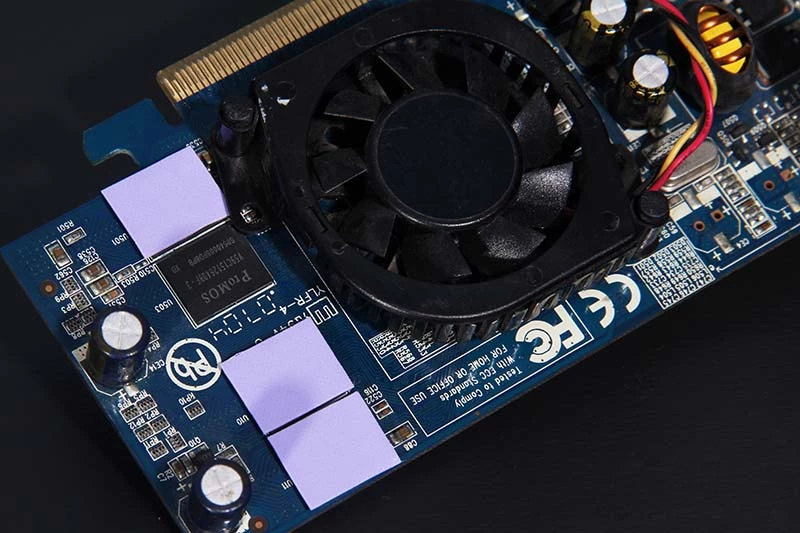
Understanding What a Thermal Pad for Processor Is
What is a thermal pad and how it differs from thermal paste
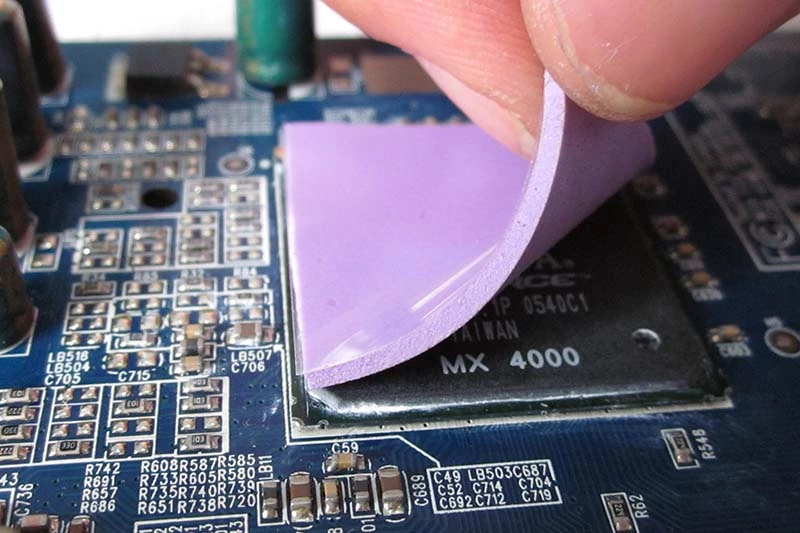
Thermal pads for processor are solid (or semi-solid) electrically insulating interface materials used to bridge gaps between a processor heat source and a heatsink or plate. Think of thermal paste as the "liquid fix"—it’s great for microscopic gaps but can be a nightmare to apply consistently at scale.
Difference in a nutshell:
- Thermal pad for processor = clean, repeatable, gap-filling, easy to place at scale.
- Thermal paste = messy but mighty — better micro-contact at low BLT and for high-performance CPUs/GPUs.
When to choose a thermal pad for processor:
- Automated production lines using die-cut pads and pick-and-place equipment, where repeatable placement eliminates the process variability of manual paste dispensing.
- Industrial and rugged processors operating in high-vibration environments, where pad tack and compression set resistance prevent interface degradation over 5-10 year service intervals.
- Small-form-factor designs where pad compressibility accommodates multi-height component stacks and paste rework would require unacceptable disassembly time.
- Electrically live processor packages or exposed PCB traces requiring dielectric isolation between the heat source and grounded heatsink.
Where thermal pads are preferred for processor cooling
- Production lines with die-cut placement or pick-and-place automation.
- Industrial or rugged processors with vibration and longevity needs.
- Small-form-factor devices where pad compressibility and conformability beat paste rework.
Key Specifications to Compare When Choosing a Thermal Pad for Processor
Note: standards matter — test methods like ASTM D5470 are frequently referenced for comparative thermal measurements.
Sheen technology Silicone Thermal pad Performance Review
| Siliocne Thermal Pad | Thermal Resistance@30psi,1mm ℃*in²/W | Thermal Conductivity W/m·K | Flame Rating UL 94 | Operating Temp ℃ |
| SF100 | 0.90 | 1.5 | V-0 | -50~200 |
| SF300 | 0.70 | 2.0 | V-0 | -50~200 |
| SF400 | 0.50 | 2.5 | V-0 | -50~200 |
| SF500 | 0.45 | 3.0 | V-0 | -50~200 |
| SF600 | 0.35 | 5.0 | V-0 | -50~200 |
| SF700 | 0.25 | 7.0 | V-0 | -50~150 |
| SF800 | 0.22 | 8.0 | V-0 | -50~150 |
| SF1000 | 0.18 | 10.0 | V-0 | -50~125 |
| SF1200 | 0.15 | 12.0 | V-0 | -50~125 |
| SF1500 | 0.10 | 15.0 | V-0 | -40~120 |
Need help selecting the right SF-series pad for your specific processor? Download the complete Sheen Technology Thermal Pad datasheet.
Thermal conductivity (k) — why it’s not the whole story
k-value (W/m·K) is necessary but not sufficient. Real-world performance depends on: contact resistance, surface flatness, BLT (bond-line thickness), and compressibility.
A pad with 15 W/mK that doesn't compress well is worse than a 5 W/mK pad that makes perfect contact.
Bond-line thickness (BLT) and compressibility — effective R″ = t/k
Effective thermal resistance scales with BLT: R″ ≈ t / k. Thinner pad with same k performs better — but it must still compress to fill asperities.
Choose pad thickness to achieve target compressed BLT under expected clamping force.
Dielectric strength, hardness (Shore) and compression set (durability)
- Dielectric strength — required for electrically live processors or exposed traces.
- Hardness (Shore A/00) — balances handling vs conformability.
- Compression set — indicates long-term deformation; low compression set = better longevity for fixed assemblies.
Practical checklist (quick glance)
- Target thermal impedance (°C·cm²/W) at expected BLT.
- k-value at operating temperature range.
- Compression behavior and compression set after thermal cycling.
- Dielectric strength and any fillers that could be galvanically active.
- Available adhesive backing or die-cut options for assembly.
Sheen Technology's application engineers can run these calculations for your design using your specific parameters.
How to Choose the Best Thermal Pad for Processor Type & Use Case
Desktop CPU & high-TDP processors — performance-first choices
Desktop CPU & High-TDP Processors: For consumer and workstation processors with TDPs above 125W, prioritize thermal pads with conductivity above 5 W/m-K and thermal impedance below 0.50 ℃*in²/W at 30 psi (refer to SF600-SF1500 range in the table above). When mounting pressure exceeds 50 psi and both surfaces are machined flat, the top-performing pads in the 8-15 W/m-K range approach paste-level performance with significantly simpler assembly.
For overclocked/liquid-cooled designs where every degree matters, thermal paste still holds a 1-3 deg C advantage at the extreme end.
If peak performance matters and BLT can be tightly controlled, consider paste — but pads with low thermal impedance are a solid compromise for ease-of-use.
Industrial / rugged processors — vibration and longevity considerations
Vibration is the enemy here. Choose a pad with high "tack" and excellent compression set to ensure it doesn't shift during mechanical stress.
Look for pads that resist cold flow and maintain contact after thermal cycling.
Small-form-factor / edge applications — conformability & EMI considerations
Thin, highly conformable pads that also provide EMI shielding options are ideal.
Consider adhesive-backed pads for placement accuracy and to prevent micro-movement.
Installation Best Practices for a Thermal Pad for Processor
Preparing surfaces: cleaning and flatness checks
Clean both surfaces: isopropyl alcohol wipe, dry, inspect for residues.
Check flatness — a warped sink cannot be fixed by a pad alone.
Choosing the correct thickness and ensuring target compression (BLT control)
Don't just "guess" the thickness. Use test fixtures or trial assemblies to measure compressed BLT under final clamp force. If your gap is 0.5 mm, select a pad with uncompressed thickness approximately 1.3x to 1.5x the target gap — a 0.75 mm pad provides ~33% compression, within the optimal 10-50% compression range for most silicone pads.
The exact compression target depends on the specific pad's deflection curve: consult the manufacturer's force-vs-deflection data to verify that your assembly's clamping force achieves the target percentage. Under-compression leaves air gaps; over-compression risks silicone oil bleed (bleeding) and excessive stress on PCB or processor substrate.
If your line varies clamping force, select pads with wider compressibility range.
Placement tips: die-cut alignment, adhesive-backed pads, avoiding trapping air/dust
- Use die-cut pads matched to die outline to prevent overhang and trapped debris.
- Adhesive-backed pads simplify pick-and-place and reduce misfeeds.
- Cleanroom tweezers / suction nozzles reduce trapped dust.
- For duplicate outline items in your process, standardize pick-and-place feeders to reduce mifeeds.
Troubleshooting: Common Problems with Thermal Pads for Processor & Fixes
High ΔT or hotspots — causes & quick checks
Causes: insufficient compression (BLT too thick), pad delamination, gap at edge, incorrect pad thermal impedance.
Quick checks:
- Verify compressed BLT under clamp.
- Inspect pad seating and die-cut alignment.
- Swap to a known-good pad to isolate material vs assembly issue.
Pad compression set or permanent deformation — Mitigation and Replacement Policy
Mitigations:
- Choose low compression set materials; allow for periodic replacement in maintenance schedules.
- Update procurement specs to require compression set limits after X thermal cycles.
Electrical shorts or galvanic corrosion — insulating pad selection & compatibility checks
- Use fully dielectric pads when live conductors or exposed traces are present.
- Verify filler chemistry against mating surface metals to avoid galvanic pairs.
Assembly line issues: mifeeds or die-cut tolerance — operational fixes
- Tighten die-cut tolerances and feeder specs.
- Add inline vision checks and a simple reject rule to stop misfeeds before reflow.
FAQ — Thermal Pad for Processor (Others Asked)
Q: Are thermal pads better than paste for desktop CPUs?
A: For most high-TDP desktop CPUs, paste can deliver slightly better peak thermal performance if BLT and mating surfaces are ideal. Thermal pads win for repeatability, cleanliness, and automated assembly.
Q: How thick should a processor thermal pad be?
A: Choose a pad that compresses to your target BLT under final clamp. Typical starting thicknesses are 0.5–1.5 mm before compression — test to confirm.
Q: Can thermal pads handle high-temperature processors long-term?
A: Yes — if you select pads rated for your operating range and with low compression set. Check long-term thermal cycling data.
Q: Do thermal pads provide electrical insulation?
A: Many do — verify dielectric strength on the datasheet if insulation is required.
Q: How do I test pad performance on my line?
A: Use a controlled thermal fixture to measure ΔT across known BLT and clamp force, and repeat after thermal cycling to capture degradation.
Q: Can I stack two thermal pads to make them thicker?
A: No! Stacking pads creates a massive thermal resistance barrier at the interface between the two pads. Always buy the correct single-thickness pad.
Q: Do thermal pads dry out like paste?
A: Generally, no. High-quality pads are designed for 5-10 years of stability, making them ideal for "set it and forget it" industrial applications.
Q: How much compression is "too much"?
A: Most pads are designed for 10% to 50% compression. Exceeding this can crack your PCB or squeeze the silicone oil out (bleeding).
Choosing the right thermal pad for processor cooling isn't rocket science, but it is material science, it is about balancing performance, assembly scale, and long-term reliability. Pads aren’t always the ultimate thermal winner vs paste — but for scalable production, cleaner lines, and lower rework, they’re often the smarter choice. If you want pads that fit your line like a glove (without frying margins), we can help.
Request free samples for your processor thermal pad evaluation — including compressed-BLT test data for your specific application parameters. Contact our application engineering team, Let's match a thermal pad to your production process and eliminate thermal-related yield loss.
Sheen Thermal
Dongguan Sheen Electronic Technology Co., Ltd · Founded in 2008
Manufacturer of thermal interface materials and silicone foam for automotive electronics, energy storage, power electronics, communications and consumer electronics.
Certified
- ISO 9001:2015
- ISO 14001:2015
- IATF 16949:2016
What we supply
- Thermal conductivity Up to 90 W/m·K
- Thickness 0.3–10.0 mm
- Custom & samples Die-cut to drawing, 3–7 days