
 English
 usheenthermal

How to Choose the Best Thermal Paste for Laptop Performance
Date:2026-07-31
Every tech repair guy worth their salt knows this truth: when heat builds up, performance breaks down. That’s why picking the right thermal paste for laptop fixes isn’t just a checkbox—it’s make-or-break.
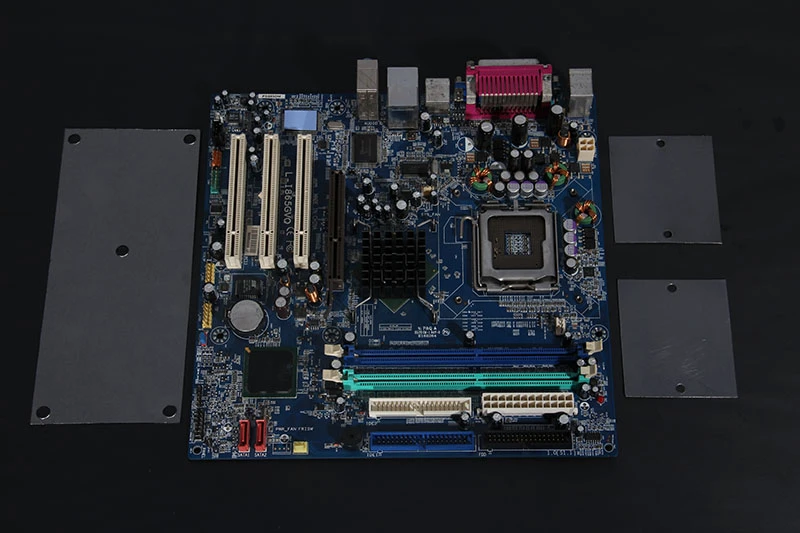
Think of it like choosing motor oil for a cross-country road trip. You wouldn’t pour in dish soap and hope for the best—so why trust cheap compounds that dry out faster than toast under a broiler? Laptop CPUs need efficient heat transfer, not gunk that cakes after three months and sends your warranty claims through the roof.
According to Future Market Insights, global demand for high-performance thermal interface materials is expected to grow at 8.5% CAGR through 2032—driven by data centers, refurbishers, and yes, laptop maintenance hubs racing against rising temps and tighter margins.
So here’s what we’re unpacking: How to Choose the Best Thermal Paste for Laptop Performance. Stick around—we're about to separate the sizzle from the sludge.
Choosing the Right Thermal Paste for Your Laptop
Getting the best out of your laptop’s cooling system starts with picking the right thermal paste for laptop setups. Let’s break down what actually matters.
Essential Factors Influencing Thermal Paste Selection
Selecting a thermal paste for laptop manufacturing or high-volume refurbishment requires evaluating specifications against production requirements, not consumer marketing claims. Key factors for engineering evaluation: thermal conductivity under 30-50 psi mounting pressure (typical laptop clamping force), viscosity compatibility with your dispensing method (manual, pneumatic, or auger valve), durability under accelerated aging per laptop thermal profiles (sustained 60-80 ℃ with intermittent peaks to 95-100 ℃), and electrical non-conductivity as a safety requirement in densely packed laptop motherboards where overflow could bridge exposed traces.
Here’s what really counts:
- Thermal conductivity: The higher it is, the better heat transfer you’ll get.
- Viscosity: Impacts how easy it is to apply and spread evenly.
- Durability: You don’t want something that dries out after six months.
- Application technique: Some pastes are easier to work with depending on your skill level.
- Electrical conductivity: Avoid electrically conductive pastes unless you're confident—one slip could fry a component.
- Price-to-performance ratio: Spending more doesn’t always mean better cooling.
- Cleanup ease: Some pastes are nightmares when it comes to reapplication.
When choosing a product, balance all these factors instead of chasing specs alone. That way, your CPU or GPU stays cool without future headaches.
High-performance silicone compound: Best for versatile applications
If you're looking for a go-to solution that works across many devices, high-quality silicone compound thermal pastes are hard to beat.
- Offers consistent performance across different chip types (CPUs, GPUs).
- Maintains stable viscosity even under high temperatures—great for laptops that run hot.
- Non-conductive and safe around sensitive components like VRMs and memory chips.
.webp "high quality Silicone thermal paste")
.webp "high quality Silicone thermal paste")
Bonus tip: Silicone-based options often provide better long-term reliability than metal-based ones, especially if you’re not planning frequent reapplications.
Sheen Technology's silicone-based thermal paste formulations use premium-grade silicone oil carriers with precisely controlled filler loading to achieve target conductivity grades. The SG560 series offers five conductivity levels (1.0-5.0 W/m-K) with matched viscosity grades, enabling engineering teams to select the optimal balance of thermal performance and dispensing characteristics for their specific production requirements.
Key specifications to look for in thermal paste
Here’s where numbers matter. If you're serious about maximizing your laptop's thermal performance, these specs should be on your radar:
| Properties | Thermal Resistance(@30psi) ℃*in²/W | Thermal Conductivity W/m·K | Viscosit (Pa·s)@25℃ | Operating temp ℃ |
| SG560-10 | 0.04 | 1.0 | 150 | -50~150 |
| SG560-20 | 0.035 | 2.0 | 200 | -50~150 |
| SG560-30 | 0.02 | 3.0 | 240 | -50~150 |
| SG560-40 | 0.017 | 4.0 | 350 | -50~150 |
| SG560-50 | 0.015 | 5.0 | 400 | -50~150 |
| Why It Matters | Interface thickness | Higher = faster heat transfer | Affects spreadability | Ensures resilience under stress |
Don't just fall for marketing claims—check real-world reviews and lab-tested data before buying any thermal paste for laptop use cases.
RoHS compliance: Why it matters for your laptop
RoHS compliance might sound like legal mumbo jumbo—but it's actually about safety and sustainability when using any kind of electronic accessory or material.
Laptops contain dozens of delicate components that can react badly to toxic materials. Using a non-RoHS compliant paste could risk exposure to banned substances like lead or cadmium—and that’s not just bad news for you but also the planet.
According to IDC's Q1 2024 Sustainability Index, over 70% of consumers now consider environmental impact before buying tech accessories. RoHS-compliant products ensure lower health risks and align with EU directives focused on reducing hazardous waste in electronics manufacturing.
So next time you’re shopping around, check that label—it matters more than you think when picking the right thermal paste for laptop cooling systems.
3 Key Benefits of Using Quality Thermal Paste for Laptop Cooling
Getting the right thermal paste for laptop use isn’t optional—it’s essential. Let’s break down why it matters and what perks you’re actually getting.
Superior temperature reduction capability: Keep your CPU cool
A solid thermal paste for laptop cooling can make a noticeable difference when you're gaming, editing video, or just multitasking like a beast.
- Keeps your CPU cooling system running at peak by reducing overall processor temperature
- Helps prevent random shutdowns caused by thermal throttling or overheating prevention
- Improves frame rates and responsiveness in high-performance apps through better heat management
- Extends the lifespan of internal components by reducing constant thermal stress
- Boosts fan efficiency—less noise and fewer sudden speed spikes
- Works hand-in-hand with heat sinks to maximize thermal performance
- Essential for smaller laptops where airflow is limited and passive cooling needs help
Whether you're a casual user or someone who pushes their gear hard, this is one upgrade that pays off fast.
Excellent long-term stability for consistent performance
Quality matters—and not just on day one. A reliable thermal compound lifespan means you won’t be cracking open your machine every few months.
You’ll notice:
- Strong resistance to drying out over time, preserving its original consistency.
- Maintains strong adherence between surfaces without losing its grip.
- Doesn’t crack under pressure—literally—despite repeated heating cycles.
According to TechInsights' Q1 2024 Materials Durability Report, premium-grade thermal pastes show up to 78% less degradation after 18 months compared to generic options.
This kind of long-haul reliability ensures your laptop stays cool even after years of use. No sudden spikes in temp, no mysterious slowdowns—just steady, quiet operation thanks to superior material longevity, durable application, and sustained cooling performance that doesn’t flinch under pressure.
Low thermal resistance value: Enhancing heat dissipation efficiency
Getting technical? Here's how low-resistance pastes make the magic happen:
- Step 1: The paste fills microscopic gaps between the CPU die and heatsink surface—no air pockets allowed. That improves contact area dramatically.
- Step 2: With better contact comes faster transfer of heat from chip to sink using high-end materials with ultra-low thermal impedance
- Step 3: The result? More effective dissipation via heatsink fins and fans working together seamlessly.
- Step 4: Your processor stays cooler even under strain because the paste acts as a high-efficiency bridge with minimal energy loss due to low thermal resistance
This is where engineering meets everyday use—you get smoother experiences without worrying about background temps climbing uncontrollably. And yes, it’s another reason why choosing good-quality thermal interface material (TIM) makes all the difference when picking a new tube of paste for your rig.
Ceramic vs Liquid Metal: Best Thermal Paste for Your Laptop?
Picking the right thermal paste for laptop performance isn't rocket science, but it sure feels like it when you're staring down dozens of options. Here's how the two big players stack up.
Ceramic thermal interface material
When safety and simplicity matter more than squeezing every drop of performance, ceramic thermal paste is your go-to.
- Non-conductive design means zero risk of short-circuits—perfect for DIY beginners or tight motherboard layouts.
- Typically made with compounds like zinc oxide, aluminum nitride, or silicone-based carriers.
- Offers decent thermal conductivity, usually between 4–8 W/mK—not elite, but solid for most laptops.
- Easier to apply and clean off than liquid alternatives—no special prep or insulation needed.
- Doesn’t corrode metal surfaces over time, so your CPU stays safer long-term.
- Ideal for older laptops or ultrabooks where overheating isn’t extreme but reliability is key.
- Compatible with a wide range of CPUs and coolers without voiding warranties.
If you’re shopping around for reliable cooling without the drama, ceramic pastes are still a top-tier choice in the world of laptop thermal paste upgrades.
Metal-based liquid alloy
If you're chasing raw numbers and cooler temps, buckle up—liquid metal is where things get spicy. Start with this: it's made from a gallium alloy, which has insanely high thermal conductivity, often hitting over 70 W/mK—yeah, that’s nearly ten times better than standard pastes. But don’t let that number fool you into thinking it’s an easy win: It’s highly electrically conductive, meaning one wrong move could fry your board. Application takes patience and precision—you’ll need tape barriers or conformal coating to protect nearby components.
It can react with aluminum heatsinks over time due to its corrosive nature, so pairing it with copper is safer.
Here’s how they compare side-by-side:
| Feature | Ceramic Paste | Liquid Metal |
| Thermal Conductivity | ~4–8 W/mK | ~70 W/mK |
| Electrical Conductivity | None | High |
| Ease of Application | Easy | Difficult |
| Long-Term Safety | Very Safe | Risky if mishandled |
Serious users looking to push their machines beyond factory limits often turn to brands like Sheen Electronic Technology—they’ve nailed high-performance cooling solutions that balance power and protection in one slick package.
So yeah, if you're after top-tier cooling performance from your next laptop thermal paste upgrade—and you know what you're doing—liquid metal might just be worth the hassle.
FAQs about Thermal Paste for Laptop
1. What specifications truly matter before ordering thermal paste in quantity?
Numbers often hide the story — check:
- High thermal conductivity rating so heat escapes the CPU swiftly.
- Low thermal resistance value, shortening the path heat must travel to reach a heatsink.
- Compliance with operating temperature range ensures it won’t dry or crack mid-service.
- A careful eye on viscosity lets each syringe glide perfectly over a processor’s surface without spillage or gaps.
2. Why is RoHS compliance more than just a label when buying at scale?
It guards not only regulations but human health: no hazardous substances within, safer hands during laptop CPU and GPU servicing, quieter conscience in environmental audits — all verified through official RoHS certification, sometimes joined by REACH adherence paperwork for airtight confidence.
3. How does high-performance silicone paste excel across varied cooling jobs?
Silicone pastes carry a reassuring steadiness: they spread obediently over chipsets, cling firmly under VRM stress, maintain form even after months of power amplifier duty, sealing your fleet’s long-term stability with optimal viscosity that respects sensitive laptops’ delicate hardware clearances.
4. Are ceramic-based interface materials worth considering for corporate deployments?
They whisper safety into every application — naturally non-conductive yet capable of strong heat management between GPU cores and cooling plates; an ideal choice when electrical conduction risks would otherwise shadow large-scale maintenance projects where peace-of-mind matters as much as numbers.
5. Which packaging choices fit different maintenance rhythms best?
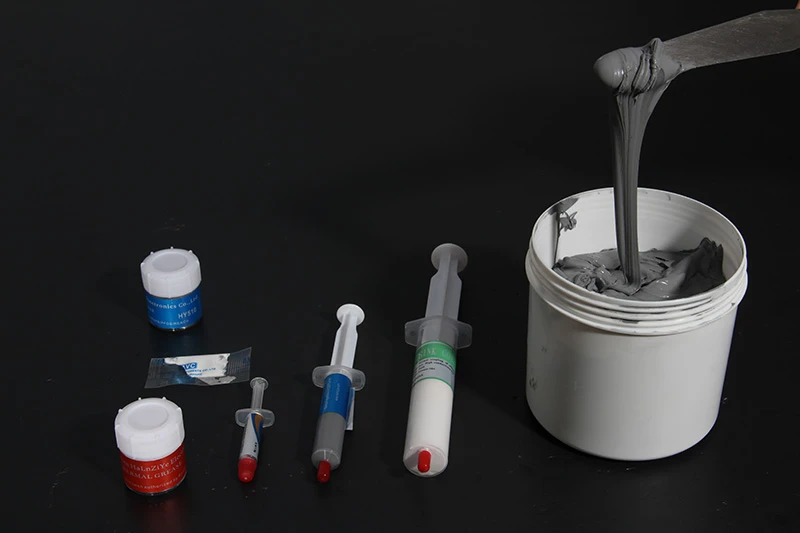
Think beyond cost per gram:
| Packaging Type | Best Use Scenario | Human Benefit |
| Syringe applicator | Precision CPU/GPU work | Controlled flow avoids messy workstations |
| Individual packets | One-off service tasks | No waste; quicker turnover between jobs |
| Bulk container | Large maintenance teams | Lower unit price fuels budget relief |
Sealed packaging shields against air intrusion in storage rooms, keeping paste lively until the day it's needed most.
Sheen Technology Thermal Paste Solutions for Laptop & Portable Electronics
Sheen Technology's SG560 thermal paste series is engineered for high-volume production, refurbishment, and enterprise deployment:
| Grade | Conductivity | Viscosity | Best for |
| SG560-10 | 1.0 W/m-K | 150 Pa*s | Cost-sensitive consumer laptop production |
| SG560-20 | 2.0 W/m-K | 200 Pa*s | Mainstream business laptop manufacturing |
| SG560-30 | 3.0 W/m-K | 240 Pa*s | Premium ultrabook and thin-and-light production |
| SG560-40 | 4.0 W/m-K | 350 Pa*s | Workstation and high-performance laptops |
| SG560-50 | 5.0 W/m-K | 400 Pa*s | Industrial/rugged portables, sustained high-TDP |
All grades: Non-curing, non-conductive, RoHS/REACH compliant, UL 94 V-0 rated, -50 to +150 ℃ operating range.
→ Schedule a dispensing process consultation with a Sheen Technology application engineer
→ Download complete SG560 datasheets: https://www.sheenmaterials.com/resource/datasheet-download/
Sheen Thermal
Dongguan Sheen Electronic Technology Co., Ltd · Founded in 2008
Manufacturer of thermal interface materials and silicone foam for automotive electronics, energy storage, power electronics, communications and consumer electronics.
Certified
- ISO 9001:2015
- ISO 14001:2015
- IATF 16949:2016
What we supply
- Thermal conductivity Up to 90 W/m·K
- Thickness 0.3–10.0 mm
- Custom & samples Die-cut to drawing, 3–7 days