
 English
 usheenthermal

High GPU Temps? Solve It Now with the Right Thermal Paste for GPU!
Date:2026-01-26
High GPU Temps? Solve It Now with the Right Thermal Paste for GPU!
Your GPU’s screaming hot, and no—it’s not a badge of honor. It could be choking under outdated or poorly applied thermal paste for GPU setups. Think about it: you wouldn’t slap peanut butter on a race car engine and call it cooling. So why settle for subpar goop between your chip and heat sink?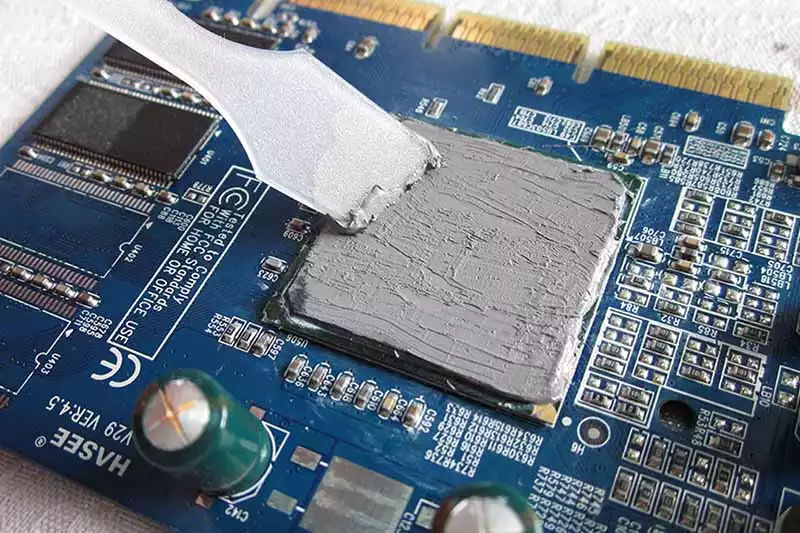
Some techs call it “the silent killer”—that thin layer of compound that makes or breaks thermal transfer in high-performance systems. According to TechNavio, the global market for thermal interface materials is set to hit $3.4 billion by 2027, driven largely by demands in electronics manufacturing.
If you’re managing fleets of GPUs—be it data centers, repair benches, or production lines—you already know: overheating isn’t just annoying… it’s expensive.
Essential Insights on Thermal Paste for GPU
1. Key Role: Thermal paste for GPU is crucial in enhancing heat dissipation and ensuring efficient cooling, preventing overheating issues.
2. Material Choice: Opt for high thermal conductivity paste with low thermal resistance characteristics for optimum performance.
3. Application Technique: Properly apply thermal paste for GPU to maximize contact between the GPU die and heatsink, ensuring effective heat transfer.
4. Regular Maintenance: Monitor GPU temperatures regularly and consider reapplication of thermal paste to maintain performance, especially in high-demand environments.
5. Storage Matters: Keep thermal paste in optimal shelf conditions to prevent degradation and ensure maximum effectiveness when needed.
Understanding High GPU Temperatures
Getting to the bottom of why your graphics card runs hot isn’t just tech talk—it’s key to keeping your rig running smooth and fast.How Thermal Interface Materials Impact GPU Efficiency
- Thermal paste quality directly affects heat dissipation between the GPU die and cooler.
- A poor TIM application can trap heat, leading to thermal throttling.
- High thermal conductivity compounds like liquid metal outperform basic pastes but require careful handling.
- The way you apply the paste—dot, spread, or X-method—also impacts performance.
- Consistent pressure from the cooling solution ensures even contact for optimal heat transfer.
Uncovering the Causes of Excessive GPU Heat
There’s no single culprit when your graphics card starts cooking, but here are some usual suspects:- Overdoing it with overclocking without proper cooling tweaks.
- Layers of dust buildup clogging up fans and heatsinks.
- Weak or blocked airflow inside cases—classic case of poor case ventilation.
- A dying or underperforming fan—yep, that sneaky little fan malfunction.
- Pushing voltage settings too high during tuning sessions.
Monitoring GPU Temperatures: Best Practices
Keep tabs on your temps like a pro:• Use tools like HWMonitor, MSI Afterburner, or HWiNFO to read real-time data from built-in temperature sensors.
• Benchmark with stress tests like FurMark or Heaven Benchmark to see how hot things get under pressure.
• Know your safe zones: idle temps below 50°C are chill; under load, don’t go over ~85°C unless you know what you're doing.
A recent report by Jon Peddie Research in Q2–2024 noted that “continuous thermal monitoring significantly reduces long-term hardware failure rates in high-performance GPUs.”
Additional Note on TIMs and Performance
Let’s break down how different types of thermal Paste perform under identical conditions:| TIM Type | Avg Load Temp (°C) | Application Ease | Reapplication Interval |
| Standard Silicone Paste | 81°C | Easy | Every Year |
| Ceramic-Based Paste | 77°C | Moderate | Every Two Years |
| Metal-Based Paste | 72°C | Tricky | Every Two Years |
| Liquid Metal | 65°C | Very Difficult | Every Three Years |
Quick Tips for Keeping Temps Low
Short bursts of advice that’ll save your gear:• Clean out dust monthly—it acts like insulation where you don’t want it.
• Don’t block exhaust vents with cables or cluttered desk setups.
• Upgrade case fans if airflow feels weak; more doesn’t always mean better—placement matters more than quantity.
Even small tweaks can keep those numbers in check and give you longer life outta your gear—and yes, better fps too.
Applying Thermal Paste: What You Should Actually Do
Here’s how to properly install new thermal paste during a GPU repaste job:Step #1 – Clean off old material using isopropyl alcohol and lint-free cloths until both surfaces shine.
Step #2 – Apply a pea-sized dot (or thin line) at the center of the die—not too much!
Step #3 – Mount heatsink carefully so pressure spreads it evenly across surface area.
Step #4 – Boot up system and monitor temps via software tools before stressing it out again.
When replacing old gunked-up material with fresh high-quality thermal paste, you'll notice instant improvements in both temp stability and clock consistency during heavy loads.
Grouped Solutions for Common Heat Issues
Let’s group together common fixes based on their cause type:Hardware-related Fixes:
• Replace failing fans showing erratic RPM behavior.
• Reseat heatsinks if contact seems uneven after checking thermal images.
• Upgrade stock coolers with aftermarket options designed for better static pressure airflow.
Airflow Optimization:
• Shift intake/exhaust fan positions for better cross-case cooling paths.
• Use positive air pressure setups to reduce dust intrusion over time.
• Remove unused PCIe slot covers near GPUs—they trap heat pockets!
Material Upgrades:
• Swap outdated paste with modern ceramic-based or liquid-metal grade options.
• Consider investing in higher-end solutions from brands tested by Sheen Electronic Technology engineers during internal benchmarking trials involving multiple rounds of synthetic workloads.
Keeping an eye on these grouped strategies ensures fewer shutdowns mid-game—and let’s be honest, no one wants their rig screaming louder than their headset mic ever does!
Thermal Paste for GPU: Why It Matters
Getting the most out of your GPU isn’t just about upgrading hardware — it’s also about managing heat. That’s where quality thermal paste for GPU comes into play.5 Key Benefits of High Thermal Conductivity Paste
• Improves overall performance by keeping temperatures in check during intense gaming or rendering sessions.• Boosts system stability by reducing thermal throttling, especially under sustained workloads.
• Minimizes the risk of long-term damage due to overheating, extending the lifespan of your GPU.
• Enhances heat transfer, ensuring that excess heat moves efficiently from the chip to the cooler.
• Supports overclocking potential without crossing critical temperature thresholds.
Whether you're gaming or mining crypto, high thermal conductivity paste can be a game-changer in your setup.
Low Thermal Resistance Characteristics: Essential for GPUs
| Paste Type | Thermal Resistance (°C·cm²/W) | Application Ease | Reapplication Interval |
| Standard Silicone | 0.20 | 5–8 | Office PCs |
| Ceramic-Based | 0.12 | 8–12 | Gaming Rigs |
| Carbon-Based | 0.08 | 10–15 | Overclocked Systems |
| Liquid Metal | <0.02 | 15+ | Advanced Enthusiasts |
The Role of Electrically Insulating Compounds in Thermal Management
• Keeps things safe when applying paste near exposed circuits — no accidental sparks or shorts thanks to solid electrical insulation properties.• Maintains excellent thermal management, even while staying non-conductive, which is key around sensitive components like VRAM chips and MOSFETs.
• High-quality pastes with strong dielectric strength offer peace of mind during installation and operation alike.
Smart builders always look for compounds that balance thermal efficiency with electrical safety — it's not worth risking a fried board over a few degrees.
Shelf Life and Storage Conditions: Why They Matter
A dried-out tube won’t do much good when you’re reapplying your paste six months down the line. Here’s what you need to know:- Store at room temp (around 20–25°C) away from direct sunlight.
- Seal tightly after use; air exposure degrades compound quality fast.
- Check expiration dates — yes, even thermal pastes have them!
Keeping your tube fresh ensures consistent application quality whenever you need a clean re-paste job on your graphics card or CPU cooler.
By understanding how different types of thermal paste for gpu behave under various conditions, you're not just protecting your rig — you're unlocking its full potential across every frame rendered and every degree cooled down.
Choosing the Best Thermal Paste for Your GPU
Picking the right thermal paste for GPU cooling isn't just about brand names—it's about real performance, ease of use, and long-term stability.Comparing Silicone-Based Thermal Grease vs. Metal Oxide Solutions
Choosing between silicone-based thermal grease and metal oxide solutions depends on what you're after: flexibility or raw heat transfer power?
| Properties | Color | Thermal Impedance (@30psi) ℃*in2/W |
Thermal Conductivity W/m·K |
Minimum Interface Thickness mm |
| SG560-10 | White | 0.04 | 1.0 | 0.05 |
| SG560-20 | White/Gray | 0.035 | 2.0 | 0.05 |
| SG560-30 | Gray | 0.02 | 3.0 | 0.05 |
| SG560-40 | Gray | 0.017 | 4.0 | 0.05 |
| SG560-50 | Gray | 0.015 | 5.0 | 0.05 |
| Test Method | Visual | ASTM D5470 | ASTM D5470 | - |
.webp "thermal paste")
.webp "thermal paste")
Silicone-based thermal grease
• Easier to apply and remove
• More forgiving on uneven surfaces
• Often cheaper and beginner-friendly
Metal oxide solutions
• Higher thermal conductivity
• Better suited for overclocking setups
• Typically lasts longer without drying out
If you're chasing peak performance from your GPU, especially under load, metal oxide is a solid bet. But if you're just doing routine maintenance or don’t want the mess, silicone's got your back.
How to Apply Thermal Paste for Optimal GPU Die Surface Contact
Getting that perfect contact between your cooler and the GPU die isn’t rocket science—but it does take a steady hand.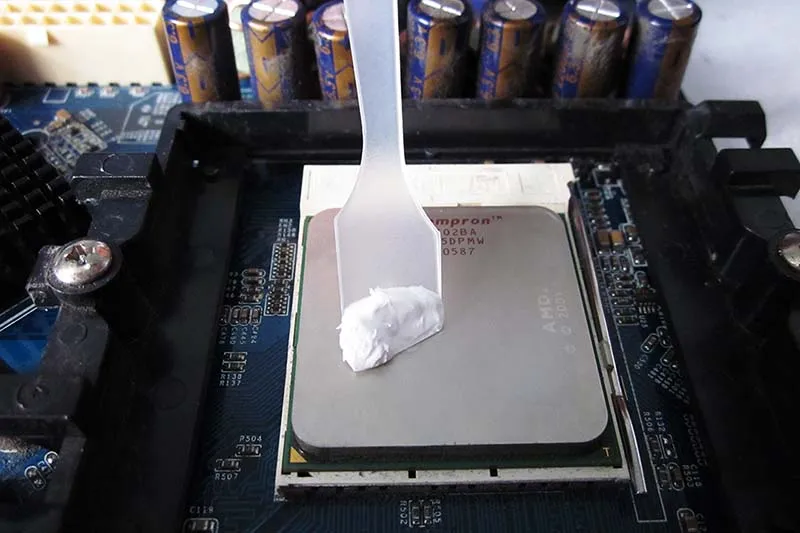
• Clean both surfaces thoroughly with isopropyl alcohol.
• Apply a pea-sized dot of paste right in the center of the die.
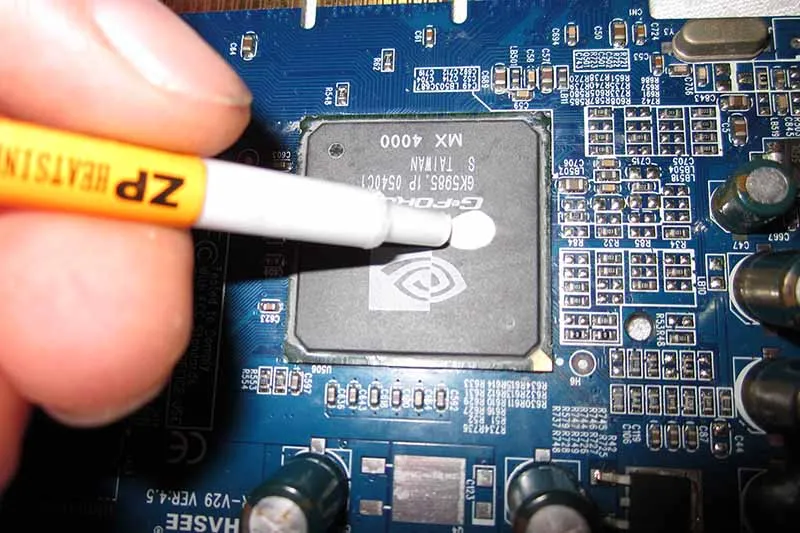
• Gently mount the heatsink using consistent pressure across all corners.
This method ensures even spread without overflow, maximizing surface contact while preventing air pockets—key when dealing with high-end graphics cards or custom cooling loops.
Evaluating Viscosity and Consistency Requirements for Effective Application
The way your paste flows—or doesn't—is all about its viscosity and overall consistency, which directly affect how it performs once applied.Low-viscosity pastes:
• Spread easily but may leak under pressure.
• Ideal for automated application systems.
High-viscosity pastes:
• Stay put but can be tricky to apply evenly.
• Great when mounting pressure is uneven or variable.
Balanced consistency:
• Offers best of both worlds—easy enough to apply yet stable under stress.
• Recommended by most DIY PC builders using mid-to-high-end GPUs.
A smooth application means better efficiency—and less chance you’ll be reapplying six months down the road.
Understanding Thermal Conductivity Value Specifications: What to Look For
Not all specs are created equal, especially when it comes to measuring actual heat transfer ability in a good-quality thermal interface material.According to TechInsights' Q1-2024 report on thermal materials: “Thermal paste with conductivity above 8 W/mK consistently outperform lower-rated alternatives by up to 22% in sustained GPU load tests.”
So what should you look at?
• Anything above 5 W/mK is decent for general use.
• Overclockers or gamers? Aim above 8 W/mK.
• Ultra-premium options hit values over 12 W/mK—but expect diminishing returns unless paired with top-tier coolers.
When choosing a new tube of thermal paste, check those numbers—not just marketing hype—to get real performance gains on your rig’s temperature curve.
Packaging Options: Syringe Applicator vs. Bulk Container for Easy Use
Packaging might seem like an afterthought—but it really affects how easy it is to apply your chosen compound across multiple builds or upgrades.Grouped Comparison:
Syringe Applicators:
• Precise control during application
• Less mess; ideal for single-use scenarios
• Often come pre-measured per GPU install
Bulk Containers:
• Cost-effective if you’re building multiple systems
• Requires separate tools like spatulas or applicators
• Can dry out faster if not sealed properly
For most users applying thermal paste for GPU upgrades, syringes offer convenience and accuracy. Sheen Electronic Technology’s latest lineup includes both formats—so whether you're modding one card or ten, there's something that fits your workflow perfectly.
FAQs about Thermal Paste for GPU
What advantages does high thermal conductivity paste bring to GPU cooling?A good high thermal conductivity paste bridges the tiny gap between your GPU die surface and its heat sink attachment, letting heat escape swiftly.
- Keeps temperatures in a safe zone during demanding gaming or rendering runs
- Supports a wide operating temperature range without losing grip
- Protects components from silent, gradual wear through effective thermal management.
How does low thermal resistance affect large-scale supply quality?
In production lots across continents, low thermal resistance means consistent performance—no surprise hotspots in one card but not another. This steadiness builds trust with buyers who expect every unit to match the promised specification values.
Which packaging options suit bulk orders of thermal paste for GPUs best?
Choosing how paste arrives is almost as important as choosing the formula:
| Packaging Type | Best Use Case | Human Benefit |
| Syringe applicator packaging option | Precision assembly lines | No sticky mess on fingers or workbenches |
| Bulk container packaging solution | Frequent industrial use | Lower cost per gram and stocked supply longer |
| Small jar packaging availability | Field service kits on-site repairs | Easy travel with tech gear |
Why are electrically insulating compounds crucial for international shipments?
When boxes cross oceans, an electrically insulating compound guards against stray shocks and shorts inside devices; it also holds Excellent long-term stability features even when exposed to shifting climates en route. Buyers rest easier knowing cargo arrives ready-to-use—not damaged by unseen currents.
Which viscosity and consistency traits matter before buying non-curing pastes in volume?
For an active workshop handling hundreds of cards:
★ High viscosity resists mechanical pressure shifts in transport and installation.
★ Optimal consistency prevents bleed or pump-out under heavy load so technicians aren’t forced into costly mid-life reapplications.
What shelf life concerns should be addressed before ordering thousands of units?
Shelf life isn’t just a number—it’s peace of mind over years-long projects:
- Verify storage conditions match Material safety data sheet availability guidelines; cool, dry spaces extend usable periods.
- Confirm RoHS and REACH compliance standards so stock remains legal to sell worldwide without sudden waste disposal regulation headaches.
Sheen Thermal
Dongguan Sheen Electronic Technology Co., Ltd · Founded in 2008
Manufacturer of thermal interface materials and silicone foam for automotive electronics, energy storage, power electronics, communications and consumer electronics.
Certified
- ISO 9001:2015
- ISO 14001:2015
- IATF 16949:2016
What we supply
- Thermal conductivity Up to 90 W/m·K
- Thickness 0.3–10.0 mm
- Custom & samples Die-cut to drawing, 3–7 days