
 English
 usheenthermal

How to Properly Apply Thermal Compound for CPU for Best Results
Date:2026-03-14
How to Properly Apply Thermal Compound for CPU for Best Results
Modern chips run hotter than a July sidewalk, and that tiny layer of thermal compound for CPU is the unsung hero standing between peak performance and a throttled meltdown. Get it wrong, and you’re looking at random shutdowns, noisy fans screaming for mercy, and warranty returns nobody wants to explain. In high-volume assembly, a sloppy dab isn’t just messy—it’s money leaking out the door.
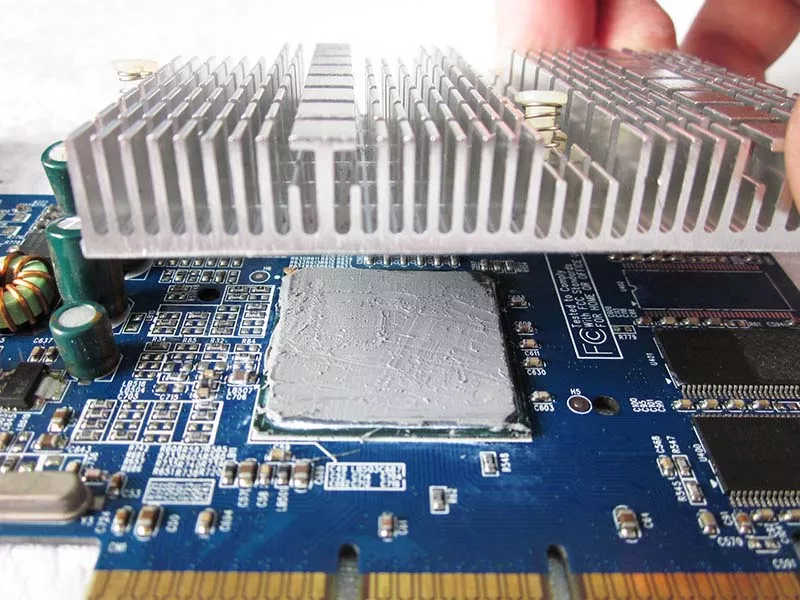
“Heat density is rising faster than most assembly standards,” notes a 2025 Sheen Electronic Technology thermal engineering manager, pointing to tighter die sizes and harsher thermal cycling demands. The message is blunt: precision isn’t optional anymore.
This guide cuts through the guesswork—how much to apply, where to place it, and how to keep results consistent on the line. No fluff. Just the steps that keep your builds cool, stable, and out of the rework bin.
Quick Answers: thermal compound for CPU
➔ Surface Prep: Clean CPU die and heat spreader with isopropyl alcohol and lint-free wipes to remove old residue and oils.➔ Application Amount: Use a pea-sized drop or controlled syringe dispense—adjust volume by paste viscosity to ensure full die coverage without overflow.
➔ Performance Check: Reassemble and run thermal cycling stress tests; monitor temperatures and fan speeds to confirm optimal conductivity.
4 Steps To Clean Old Thermal Compound
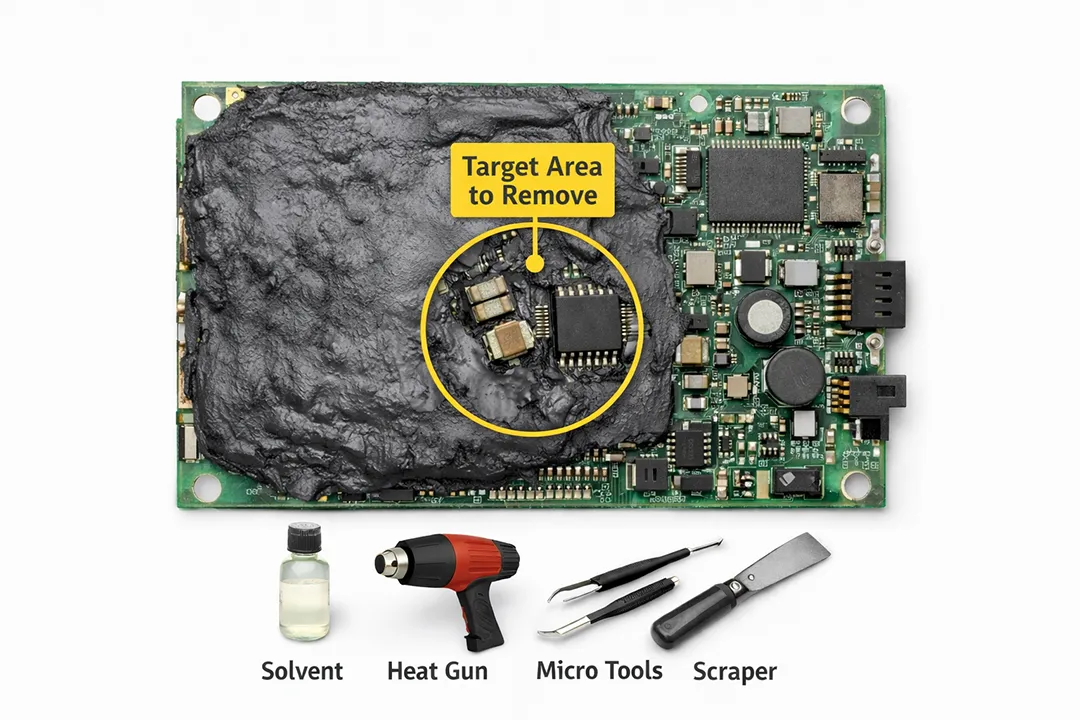
Old thermal compound for cpu can dry out, crack, and wreck heat transfer. If your rig runs hotter than usual, that crusty layer between the chip and cooler is often the culprit. Cleaning it right protects performance and keeps your next layer of thermal compound for cpu working like it should.
Step 1: Remove Aged thermal paste from CPU heat spreader and heat sinks
When stripping off aged thermal paste from the CPU heat spreader and heat sinks, stay organized:
Tools
• cleaning cloth (lint-free)
• 90%+ isopropyl alcohol
Focus areas
• Top of the CPU heat spreader
• Base plate of heat sinks
Cleaning flow:
• Lightly dampen the cleaning cloth with isopropyl alcohol.
• Wipe in small circles to lift aged thermal paste.
• Repeat until metal surfaces look even and smooth.
A clean base makes the next layer of thermal compound for cpu bond evenly, avoiding hot spots.
Step 2: Eliminate Residue to Restore Optimal thermal conductivity
After visible paste is gone, microscopic residue can still block thermal conductivity. This is where careful surface preparation matters.
• Apply a small amount of cleaning solution.
• Buff gently using a microfiber cloth.
• Check reflection under light to confirm zero streaks.
Thermal efficiency comparison:
| Surface Condition | Avg Temp Rise (°C) | Thermal Conductivity Efficiency (%) |
| Heavy residue | +12 | 72 |
| Light residue | +7 | 85 |
| Properly cleaned surface | +2 | 97 |
| Fresh thermal compound for cpu applied | +0–1 | 99 |
That tiny difference decides if your CPU runs chill or cooks itself.
Step 3: Inspect CPU die and mounting hardware for Contamination
Now shift attention to detail work around the CPU die and mounting hardware.
Visual inspection
• Edges of the CPU die
• Screws and brackets in the mounting hardware
Signs of contamination
• Dust clumps
• Corrosion marks
• Old compound overflow
Use fine cleaning tools to clear tight corners. Even small debris can tilt pressure, which ruins the spread of thermal compound for cpu and weakens contact.
Step 4: Prepare the Surface for New thermal grease or phase change material
Final prep decides how well your new thermal grease or phase change material performs.
Confirm clean surface status
• No lint
• No moisture
• Verify smooth application area
At this point, the system is ready for fresh thermal compound for cpu. Brands like Sheen Electronic Technology design high-stability thermal compound for cpu formulas that spread evenly across the application area, supporting steady heat flow from die to cooler. Apply the right amount, mount with balanced pressure, and your CPU is back in the safe zone.
Which CPU Paste Amount Is Just Right?
Getting the amount of thermal compound for cpu just right can feel tricky. Too much turns messy. Too little hurts heat flow. Let’s break it down in plain talk so your CPU stays cool and your build runs smooth.
Pea-Sized Drop on the CPU heat spreader
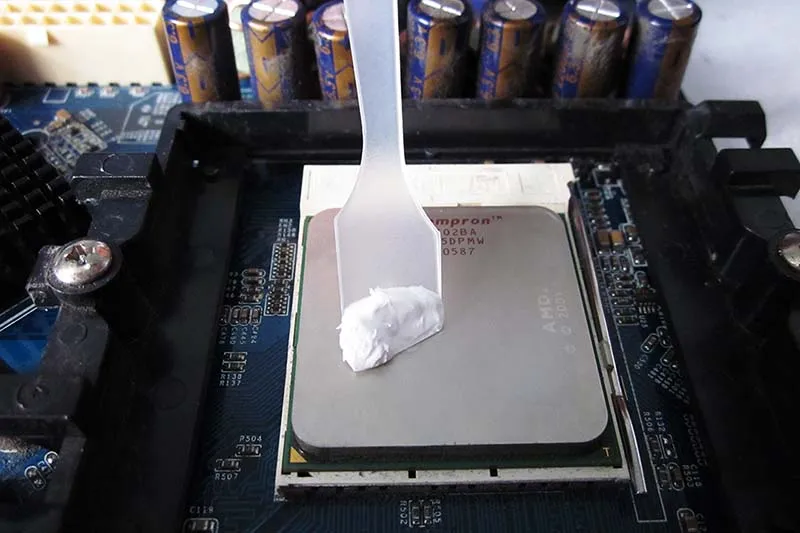
When using a pea-sized drop on the CPU heat spreader, the goal is clean thermal paste application with solid heat transfer.
Core principle
• Center a small pea-sized drop directly on the CPU heat spreader.
• Let mounting pressure spread the thermal compound for cpu naturally.
Why this works
A: Pressure-driven spread
• The cooler base presses down.
• The paste flows outward across the coverage area.
B: Air gap reduction
• Fewer trapped bubbles.
• Better surface contact between die and heatsink.
Practical tips
• Use standard thermal paste for cpu, not industrial adhesive.
• Don’t manually smear before mounting.
• After removal, check the spread pattern to confirm full contact.
For most builders, this method balances simplicity and performance when applying thermal compound for cpu.
Thin Spread Method Using syringe application of thermal paste
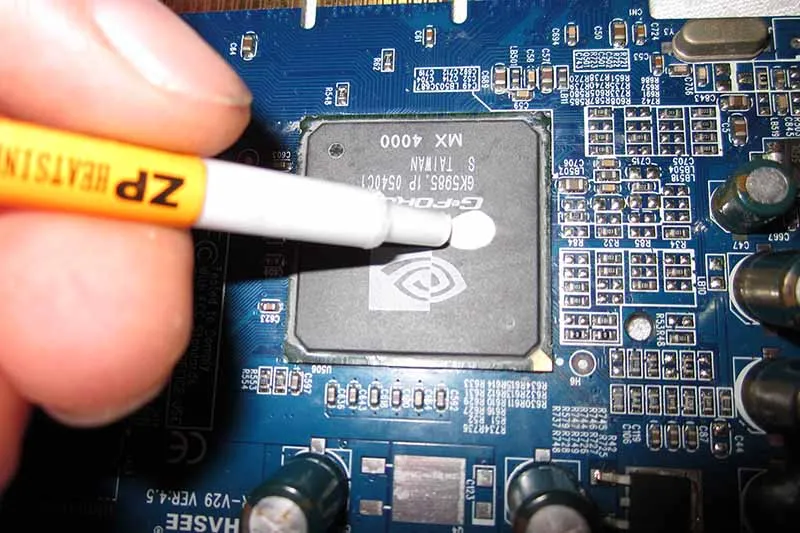
This approach relies on careful syringe application of thermal paste and hands-on control. Apply a small line, then spread into a thin spread layer. Aim for even distribution edge to edge. Keep thickness minimal to support fast heat dissipation.
1) Place a small amount of thermal compound for cpu in the center.
2) Use a clean spreader to guide the paste outward.
3) Inspect the surface for gaps or streaks.
Some builders like this because it feels precise. Short strokes. Light pressure. Smooth finish.
In IDC’s 2025 report on PC hardware trends, analysts noted that “thermal interface material consistency remains a key factor in sustained processor performance under high-load computing.” That lines up with real-world results—uniform paste means stable temps during gaming or rendering.
Brands like Sheen Electronic Technology design cpu thermal compound with stable flow to support this method, making the layer easier to control without clumping.
Viscosity and specific gravity determine optimal thermal grease volume
The right amount of thermal grease depends heavily on viscosity and specific gravity.
Understanding paste behavior
A. High viscosity
• Thicker paste consistency.
• Requires slightly more mounting pressure.
B. Lower viscosity
• Spreads faster.
• Risk of overflow if volume is excessive.
Impact of specific gravity
• Heavier compounds may settle firmly under compression.
• Lighter blends move outward more easily.
Adjusting application amount
• Start with a conservative drop of thermal compound for cpu.
• Mount cooler evenly in diagonal screw order.
• Remove and inspect if unsure about full coverage.
High-quality cpu thermal paste with balanced thermal conductivity helps reduce guesswork. Sheen Electronic Technology focuses on stable density control so builders can dial in optimal volume without paste spilling onto sockets.
In the end, picking the right thermal compound for cpu is less about luck and more about matching volume to material behavior. Keep it neat, keep it centered, and let physics handle the spread.
Layered: Prep, Apply, Mount, Test
A solid cooling build starts simple: clean surfaces, precise thermal compound for cpu use, tight mounting, and real testing. Mess up one part and your cpu thermal compound won’t save you. Let’s get hands-on and do it right.
Surface Prep for CPU die and heat spreader
Getting thermal compound for cpu performance right begins with clean metal.
Core contact surfaces
CPU die
• Inspect for oxidation
• Check for scratches
Heat spreader
• Confirm flatness
• Ensure no old thermal paste residue
Cleaning process Materials
• Isopropyl alcohol (≥99%)
• Approved cleaning solution
• Lint-free cloth
Actions
• Gentle residue removal
• Circular wipe for full surface cleanliness
| Cleaning Agent | Purity (%) | Evaporation Time (sec) |
| Isopropyl Alcohol | 99 | 10–20 |
| Industrial Cleaning Solution | 95 | 30–45 |
| Mixed Solvent | 90 | 40–60 |
A spotless CPU die and heat spreader mean your thermal compound for cpu bonds evenly. Skip this, and even premium cpu heat paste struggles.
Apply thermal paste with precision using syringes
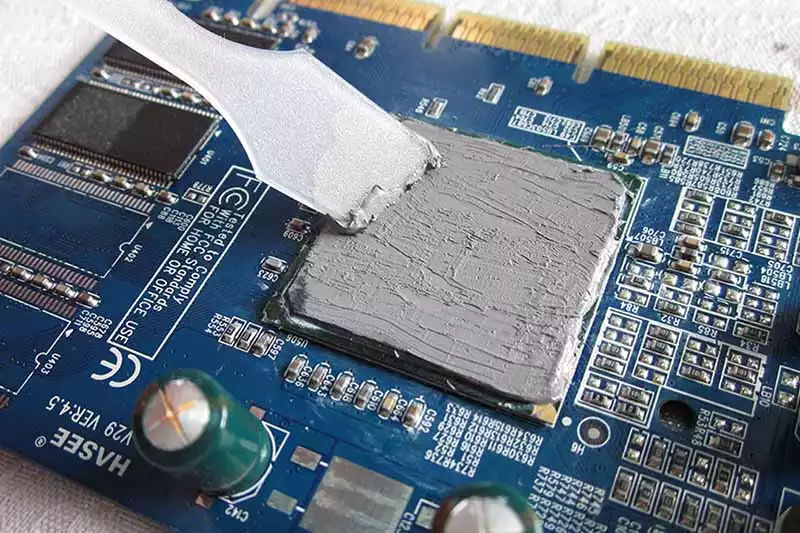
Precision beats guesswork when applying thermal compound for cpu.
Dispensing tools
• Manual application syringe
• Automated dispenser
Application control
• Classic pea-sized amount
• Adjust by coverage area
Technique
• Slow dispensing technique
• Avoiding air bubbles
• Maintain even spread
Quality checkpoints
• Uniform even spread
• No overflow at edges
• Full die contact
Using the right thermal compound for cpu ensures stable heat transfer. A sloppy blob traps air. A clean line with good cpu thermal compound keeps temps steady and predictable.
Mount heat sinks, heat pipes, and secure mounting hardware
Mounting is where pressure makes or breaks the thermal compound for cpu layer.
Start by aligning the heat sink over the CPU die. Seat attached heat pipes or vapor chambers flat against the heat spreader.
Then secure the mounting bracket:
• Insert screws lightly.
• Follow a diagonal tightening sequence.
• Increase torque gradually to balance pressure distribution.
Checkpoints:
• No tilt
• Even contact
• Firm, secure attachment
When paired with high-quality thermal compound for cpu solutions from Sheen Electronic Technology, proper mounting squeezes the compound into a thin, efficient interface. That thin bond line is what makes cpu cooling paste actually work.
Test cooling efficiency and thermal cycling reliability
Testing proves if your thermal compound for cpu choice holds up.
Baseline readings
• Record idle temperatures
• Log ambient room temp
Performance checks
• Controlled load testing
• 30-minute stress test
• Real-time temperature monitoring
Reliability validation
• Repeated power cycles
• Extended thermal testing
• Observe long-term stability
Track cooling performance across cycles. Good thermal interface material maintains tight temperature variance. If temps creep upward after cycling, your thermal compound for cpu layer may be uneven or degrading.
With disciplined prep, accurate application, firm mounting, and real-world testing, thermal compound for cpu stops being just paste and becomes serious thermal insurance.
Scenario: High-End Gaming—Reduce Temps With Paste
High-end gaming rigs push heat hard. If your thermal compound for cpu isn’t up to the task, CPU temperature spikes fast. Let’s tune your cooling stack for smoother frames and safer silicon.
High thermal conductivity thermal paste for overclocked gaming CPUs
When tuning overclocked CPUs, the right thermal compound for cpu becomes a performance part, not an afterthought.
• Core goal: improve thermal conductivity and stabilize CPU temperature
• Target: sustained gaming performance
• Method: correct thermal paste application
Material Selection
Metal-based
• High thermal conductivity
• Best for extreme heat dissipation
• Check compatibility with nickel-plated IHS
Ceramic-based
• Safer, non-conductive
• Stable for daily gaming loads
Liquid metal
• Elite heat transfer
• Requires insulation around SMD components
Compatibility Check
• CPU heat spreader material
• Cooler cold plate finish
• Mounting pressure design
Application Control
• Pea-size drop for standard dies
• Thin spread for larger dies
• Even mounting torque
A high-grade cpu thermal compound directly improves heat flow from die to cooler. That’s why many builders trust Sheen Electronic Technology for stable overclocking setups. A reliable thermal compound for cpu keeps clocks steady without thermal throttling drama.
Vapor chambers, fans, and premium compounds for stable gaming thermals
Raw paste alone won’t save a hot system. Real stability comes from smart stacking of hardware and a solid thermal compound for cpu.
• Vapor chambers flatten hotspot spikes fast.
• High static cooling fans push heat outward.
• Premium thermal paste bridges micro-gaps.
Heat path matters:
• CPU die
• IHS
• thermal compound for cpu layer
Cold plate
• Fin stack
• Airflow exhaust
Short bursts are easy. Long raids and ranked matches? That’s where gaming thermals test system stability.
A quick checklist helps:
✔ Even mounting pressure
✔ Clean surface before applying cpu paste
✔ Proper fan curve tuning
Good heat management boosts component longevity. Builders using solutions from Sheen Electronic Technology often report steadier frame pacing under load. The right cpu heat paste paired with vapor chambers turns chaos into controlled airflow.
Long gaming sessions demand compounds with wide operating temperature range and long-term stability
Marathon gaming stresses materials. A weak thermal compound for cpu dries out, causing thermal degradation and rising CPU cooling demands.
Operating Temperature Rating
• Minimum: sub-zero idle stability
• Maximum: 200°C+ tolerance
• No pump-out under thermal cycling
Stability Over Time
• Resistant to cracking
• Maintains bond thickness
• Preserves consistent performance
Reliability Standards
• ISO 9001 manufacturing
• Batch traceability
Verified long-term stability testing
Extended long gaming sessions create expansion and contraction cycles. A dependable thermal compound for cpu handles that movement without thinning out. That’s real durability.
For serious rigs, Sheen Electronic Technology offers engineered cpu thermal compound options designed for wide operating temperature range coverage. Stable paste means steady clocks, smoother matches, and no surprise shutdowns mid-fight.
FAQs about Thermal Compound For Cpu
What is the correct process to clean old thermal compound for CPU surfaces?
Old thermal paste left on a heat spreader or CPU die slowly chokes heat flow. Clean it with care:
• Use lint free wipes with high purity isopropyl alcohol.
• Wipe in one direction to lift residue from the heat spreader and cold plates.
• Check mounting hardware and heat sinks for corrosion or uneven pressure marks.
For stubborn buildup around chipsets or GPU dies, a plastic edge can gently lift dried thermal grease. Let the surface dry fully—any trapped solvent weakens long term stability and thermal cycling reliability. A clean interface restores direct contact with vapor chambers and heat pipes, keeping temperatures under control.
How much thermal compound for CPU should I apply?
A small amount controls temperature; too much traps heat.
• Place a pea sized drop at the center of the CPU die.
• Mount the heat sink evenly so pressure spreads the paste.
• Avoid manual spreading unless using liquid metal or phase change material.
Viscosity and specific gravity influence how thermal paste flows. With correct clamp force from mounting hardware, the layer becomes thin and uniform—exactly what high thermal conductivity materials need to perform.
Which type of thermal interface material suits high-performance or overclocked systems?
Choosing the right thermal interface material shapes stability during long gaming or rendering sessions.
| Material | Key Strength | Typical Use Surface |
| Thermal paste / grease | Balanced thermal conductivity & dielectric strength | CPU die, GPU die |
| Liquid metal | Extremely high conductivity, requires caution | Bare heat spreader |
| Thermal pads / gap filler | Handles uneven gaps | Memory modules, power transistors |
| Phase change material | Controlled melt, clean install | Pre applied on heat sinks |
Look for wide operating temperature range, stable cure time, and proven long-term stability under repeated load spikes.
How should bulk buyers evaluate quality when sourcing thermal compound for CPU production?
In large assembly lines using screen printing, stencil printing, or automated dispensing, consistency matters more than branding.
• Confirm RoHS compliance and REACH compliance.
• Request UL certification data for dielectric strength.
• Review ISO 9001 documentation for lot traceability.
• Match packaging—syringes, cartridges, pails, or drums—to your dispensing method such as jetting or roller coating.
Stable viscosity across bulk containers ensures even coverage on heat spreaders and cold plates. When quality slips, temperatures climb quietly—until systems throttle, fans roar, and failure follows.
Sheen Thermal
Dongguan Sheen Electronic Technology Co., Ltd · Founded in 2008
Manufacturer of thermal interface materials and silicone foam for automotive electronics, energy storage, power electronics, communications and consumer electronics.
Certified
- ISO 9001:2015
- ISO 14001:2015
- IATF 16949:2016
What we supply
- Thermal conductivity Up to 90 W/m·K
- Thickness 0.3–10.0 mm
- Custom & samples Die-cut to drawing, 3–7 days