
 English
 usheenthermal

Thermal Management Solutions for Consumer VR/AR Headsets
Date:2026-01-17
Thermal Management Solutions for Consumer VR/AR Headsets
VR headsets are cooking up more than just cool experiences—they’re also cooking themselves. As devices get sleeker and processors punch harder, thermal management solutions have become the unsung heroes behind every sweat-free gaming session or training module that doesn’t crash halfway through.
According to IDC’s 2023 report, over 13 million consumer VR/AR units shipped globally last year—a number projected to double by 2026. That kind of growth puts serious pressure on engineers and procurement teams to keep things chill—literally.
Nobody wants a headset that turns into a forehead furnace after ten minutes. We’re talking about gear that needs to stay cool in tight quarters without blowing up costs or design plans.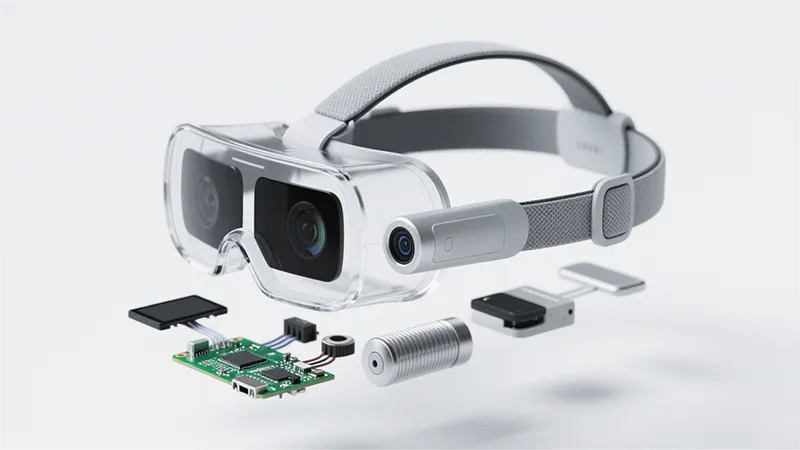
The Impact of Ambient Temperature on VR/AR Performance
When the heat cranks up, VR/AR gear can get cranky too. Let’s break down how temperature messes with performance—and how smart thermal management solutions keep things cool.
How High Temperatures Compromise VR Experience
- CPU throttling kicks in fast when headsets overheat, slowing everything down.
- GPU performance tanks under thermal pressure, causing frame drops and stuttering.
- Battery life? Say goodbye—excess heat drains it faster than you'd think.
- Higher display latency leads to motion sickness and laggy visuals.
- Sensors start to misbehave due to sensor drift, throwing off tracking accuracy.
When ambient temperatures push past comfort zones, the entire system struggles. That’s why consistent cooling is a top priority in modern thermal management solutions, especially in mobile or standalone VR devices.
Thermal Degradation Effects on Headset Components by Temperature Range
| Component | <30°C | 30–40°C | >40°C |
| Battery Life | Normal | ↓10–20% | ↓30–50% |
| GPU Clock Speed | Stable | Slight drop | Throttling starts |
| Display Latency | Low | Medium | High lag risk |
| Sensor Accuracy | Stable | Drift begins | Severe drift |
Even minor increases in ambient temperature can lead to major stability issues unless proper cooling strategies are built-in using reliable thermal management solutions.
Essential Thermal Management Solutions for VR/AR Headsets
Getting hot while gaming isn't just a figure of speech—VR/AR headsets need smart cooling to keep things smooth and safe.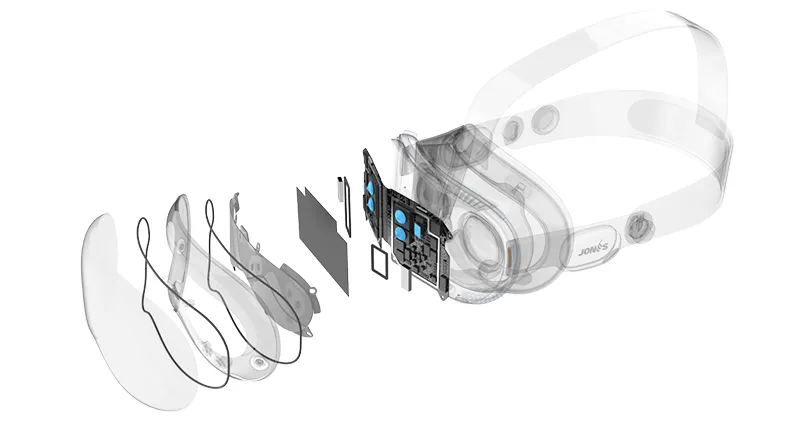
Thermal Interface Materials: Why They Matter in VR/AR
- Thermal paste fills microscopic air gaps between chips and heat sinks, improving thermal transfer.
- Thermal pads offer consistent thickness and are easier to apply than paste, ideal for mass production.
- Graphite-based TIMs are gaining traction due to their low weight and high conductivity.
Without proper interface materials, heat gets trapped near the processor,that means more fan noise, lower frame rates, and even device throttling under load. So yeah—this stuff’s not optional.
In compact VR/AR devices where every degree counts, thermal interface materials help bridge the gap between performance and safety by ensuring efficient heat flow from core components outward.
Effective Heat Sinks: Aluminum vs. Copper Choices
Aluminum or copper? Both metals shine—but differently.
- Aluminum heat sinks • Lightweight • Easy to manufacture • Lower cost
- Copper heat sinks • Superior thermal conductivity • Heavier but better for high-performance tasks • Often used with vapor chambers
In VR headsets where weight constraints meet serious processing demands, many designs combine both metals—copper cores wrapped in aluminum fins—to strike a balance between cooling power and comfort.
Cooling Fans Overview: Axial vs. Centrifugal Performance
| Fan Type | Airflow Direction | Pressure Output | Best Use Case |
| Axial Fan | Straight-through | Low | Open-space ventilation |
| Centrifugal Fan | Perpendicular | High | Tight enclosures |
Axial fans blow air directly across the surface—ideal when there's room to move it around. But inside cramped headset shells? Centrifugal fans win by pushing air with higher pressure through narrow ducts, keeping temperatures—and noise—down without bulky hardware.
Innovative Accessories for Optimal Thermal Management
Keeping cool isn’t just about big parts—it’s also about clever add-ons:
- Filters prevent dust buildup that chokes airflow.
- Thermal tape secures components while conducting heat away.
- Micro-blowers supplement passive systems without adding bulk.
- Flexible graphite sheets spread localized hotspots evenly across surfaces.
- Magnetic fan mounts make maintenance easier during teardown or upgrades.
All these accessories quietly support your headset’s internal climate control system, letting you stay immersed longer without worrying about overheating or sudden shutdowns tied to poor thermal management solutions.
By integrating well-selected cooling gear—from pastes to fans to filters—you’re not just protecting hardware; you’re unlocking smoother visuals, better battery life, and a cooler ride through virtual worlds.
Thermal interface material Management Solutions for VR/AR Headsets
Smart cooling is the secret sauce behind smooth, immersive VR/AR experiences—here’s how the pros keep things chill..webp "graphite sheet")
.webp "silicone thermal pad")
.webp "thermal paste")
Thermal Paste: The Backbone of Heat Dissipation
- Thermal paste bridges microscopic surface gaps between chips and heat spreaders, minimizing resistance and maximizing transfer efficiency.
- It prevents thermal throttling during intense rendering sessions by maintaining a stable connection for heat flow.
- High-conductivity formulas, often based on conductive materials like silver or ceramic compounds, are preferred for their long-term stability.
- In VR headsets where space is tight, even a thin smear of paste can make or break system reliability under load.
- Brands like Sheen use premium-grade pastes tested across extreme temperature ranges for consistent performance in consumer and enterprise-grade gear.
Gap Fillers: Ensuring Uniform Thermal Contact
- Gap fillers, often made from silicone elastomers, adapt easily to uneven surfaces—perfect for complex internal geometries in AR glasses.
- These materials provide high compressibility and low thermal resistance, making them ideal for filling air pockets without damaging components.
- When combined with thermal interface materials, they create a more reliable contact patch between hot components and passive cooling elements like heat sinks or chassis walls.
- According to IDC’s Q2 2024 report on wearable hardware design trends, over 68% of next-gen AR devices now incorporate multiple gap filler layers for better thermal consistency.
Benefits of Advanced Cooling Systems in VR Headsets
Keeping VR gear cool isn’t just about comfort—it’s key to performance, longevity, and saving money over time.
- Enhanced User Comfort Through Efficient Cooling.
- The Cost-Effectiveness of Investing in Cooling Systems.
- Long-Term Performance Gains with Proper Thermal Management.
For Consumers: Lower repair bills, longer-lasting devices, fewer disruptions caused by thermal throttling or system resets.
For Developers: Fewer support tickets related to overheating; more consistent user feedback tied to stable hardware performance.
According to IDC's Q2 2024 wearable tech report, nearly 22% of VR headset returns are linked directly to unresolved thermal issues—a stat that underscores the real-world value of proper cooling mechanisms embedded early in product design.
| Metric | No Thermal Management | Basic Passive System | Advanced Active System |
| Avg CPU Temp (°C) | 88 | 77 | 64 |
| GPU Throttle Frequency (%) | 38% | 19% | <5% |
| Avg Session Framerate | Drops after ~20 mins | Stable up to ~45 mins | Stable beyond an hour |
| Component Lifespan Impact | -35% | -18% | Negligible |
These numbers speak volumes—lower operating temps mean less CPU throttling, better sustained GPU performance, and rock-solid system stability even during intense rendering loads.
As noted by ABI Research in their May 2024 forecast: “Thermal regulation is fast becoming a primary differentiator among next-gen head-mounted displays.” The right tech ensures smoother framerates and extends the effective lifespan of critical components—no small feat when you're pushing pixels at lightning speed every second.
FAQs about Thermal Management Solutions
What thermal management solutions are most effective for VR/AR headsets in bulk orders?
Production-scale headset cooling thrives on combining precision parts:
- Thermal Interface Materials such as Thermal Paste, Gap Fillers, and Phase Change Materials ease heat flow between processors and sinks.
- Heat Sinks—Aluminum for lightness, Copper for sheer conductivity—anchor the system’s thermal path.
- Cooling Fans: Axial Fans sweep air across wide boards; Centrifugal Fans push it deep into compact chambers.
- Every choice here is tuned to keep repeated assembly lines feeling almost rhythmic in their reliability.
Which accessories help boost the large-scale deployment of thermal management systems?
Even small actors play big roles on the production stage:
- Fan Filters stop dust from sabotaging airflow before devices even meet customers’ hands;
- Thermal Tape secures contact points neatly without residue troubles;
- Adhesives lock heavy Bonded Fin or Skived Fin Heat Sinks onto delicate Ceramic Substrates or Epoxy Resins.
The right accessories become trust-worthy companions, ensuring each unit leaves the line ready for grueling real-world performances.
Sheen Technology embraces an “application-oriented solutions” philosophy. Contact us immediately for comprehensive thermal interface materials and professional thermal management solutions for consumer electronics VR/AR headsets.
Sheen Thermal
Dongguan Sheen Electronic Technology Co., Ltd · Founded in 2008
Manufacturer of thermal interface materials and silicone foam for automotive electronics, energy storage, power electronics, communications and consumer electronics.
Certified
- ISO 9001:2015
- ISO 14001:2015
- IATF 16949:2016
What we supply
- Thermal conductivity Up to 90 W/m·K
- Thickness 0.3–10.0 mm
- Custom & samples Die-cut to drawing, 3–7 days