
 English
 usheenthermal

How Graphene Heat Dissipation for Laptops Keeps Devices Running Cool
Date:2026-06-22
How Graphene Heat Dissipation for Laptops Keeps Devices Running Cool
Graphene heat dissipation for laptops is no longer a lab curiosity; it's the answer to overheating machines choking performance and pushing users to the edge.
Recent insights from IDC and Gartner highlight rising thermal constraints in high-performance notebooks, with OEMs exploring advanced materials like graphene to sustain thinner designs and consistent output.
That shift is happening fast.
Reading Notes: Graphene Heat Dissipation for Laptops
➔ Exceptional Conductivity: Ultra-thin graphene layers boast over 5,000 W/m·K, swiftly spreading heat away from CPUs and GPUs.
➔ Featherlight Design: Atomic-scale thickness adds negligible weight, enabling slimmer, more portable notebooks.
➔ Long-Term Stability: Resists drying, cracking, and thermal fatigue, ensuring consistent cooling under continuous high loads.
➔ Energy Efficiency: Superior heat dispersion lowers fan speeds, reduces power draw, and delivers noticeably quieter operation.
Why Choose Graphene for Laptop Cooling?
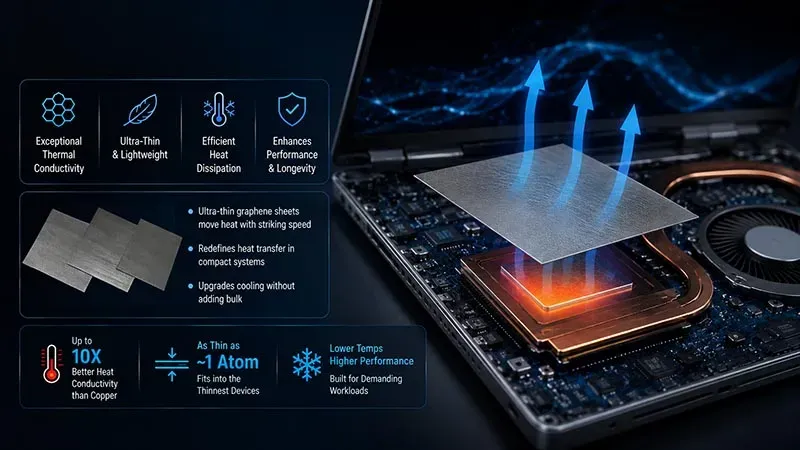
Modern users push machines hard—gaming, rendering, coding, streaming—all at once. That’s why Graphene heat dissipation for laptops is gaining serious traction. By blending thermal management, smart design, and real-world efficiency, it upgrades how heat moves through slim devices without adding bulk.
Exceptional Thermal Conductivity in Ultra-Thin Layers
When discussing Graphene heat dissipation for laptops, conductivity is the headline act. Ultra-thin graphene sheets move heat with striking speed, redefining heat transfer in compact systems.
Core thermal advantages:
· Rapid heat dissipation across broad surfaces
· Stable thermal performance under spikes
· Nano-scale thin layers with high conductivity
At a material level:
· Atomic structure
· Dense carbon lattice
· Enables superior thermal management
For laptops chasing tighter tolerances, graphene laptop cooling feels almost unfair—thin yet powerful. Graphene heat dissipation for laptops keeps performance steady without bulky copper stacks.
Ultra-Lightweight Design for Sleeker Laptop Profiles
Slim builds demand lightweight materials that don’t compromise thermal performance. Here’s how graphene supports the modern laptop form factor:
Weight benefits:
· Noticeable weight reduction
· Cleaner compact design
· Improved device aesthetics
Nested design logic:
· Integrated graphene thermal layer
· Sustained cooling without thicker plates
Portable devices thrive on grams saved. With Graphene heat dissipation for laptops, manufacturers trim excess mass while keeping heat transfer efficient. The result? Thin design, cooler palm rests, better balance in your bag.
Long-Term Reliability Under Continuous High Loads
High loads expose weak materials fast. Traditional paste dries. Graphene doesn’t flinch.
Durability pillars:
· Strong thermal stability
· Extended device lifespan
· Reliable component protection
System view:
· Consistent surface spreading
· Reduced thermal fatigue
· Greater overall reliability
For heavy users, Graphene heat dissipation for laptops means fewer thermal drops and steadier frame rates. That’s real system longevity—not marketing fluff.
Energy Efficiency and Noticeably Quieter Fans
Lower temps reshape power behavior.
Direct outcomes:
· Reduced power consumption
· Better energy saving
· Longer battery life
Thermal-to-acoustic chain:
· Less aggressive fan curves
· Enhanced fan noise reduction
· Smoother acoustic performance and true quiet operation
In practical terms, Graphene heat dissipation for laptops allows fans to chill—literally. Brands like Sheen Technology refine this approach, pairing advanced graphene laptop cooling layers with tuned airflow systems. The payoff? Cooler internals, calmer acoustics, and smarter energy use—exactly what modern users expect from next-gen Graphene heat dissipation for laptops.
Types of Laptop Heat-Spreading Materials
Laptop temperatures can climb fast when a CPU or GPU is pushed hard. From classic thermal paste to cutting-edge Graphene heat dissipation for laptops, each material handles heat in its own way. If you care about smoother gaming, stable rendering, or longer device life, understanding laptop heat control really pays off.
Thermal Paste
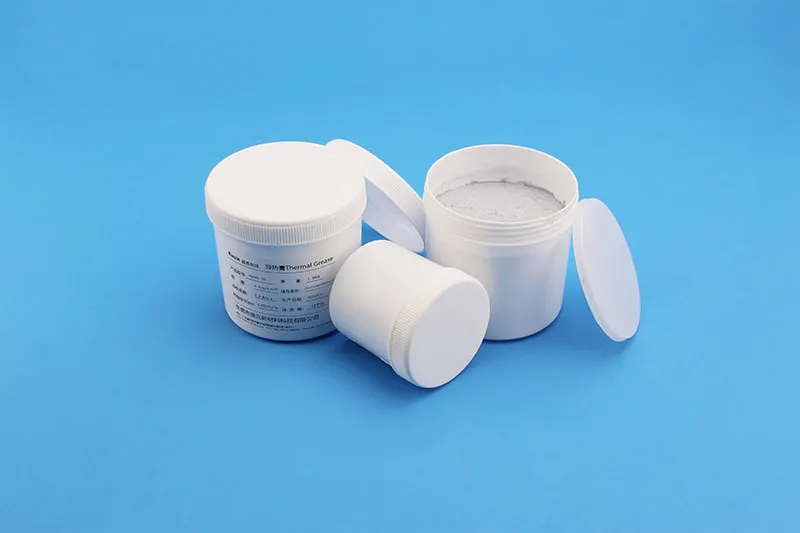
At its core, thermal paste acts as an interface material between a CPU, GPU, and heatsink. It works as a microscopic gap filler, pushing out trapped air and boosting thermal conductivity.
· Common forms: compound, liquid metal, ceramic blends
· Typical use: between chip and heatsink
· Risk: drying after long-term application
A well-applied paste can drop temps by 5–10°C. Still, it doesn’t spread heat across the chassis. That’s where graphene cooling starts to shine.
Thermal Pads
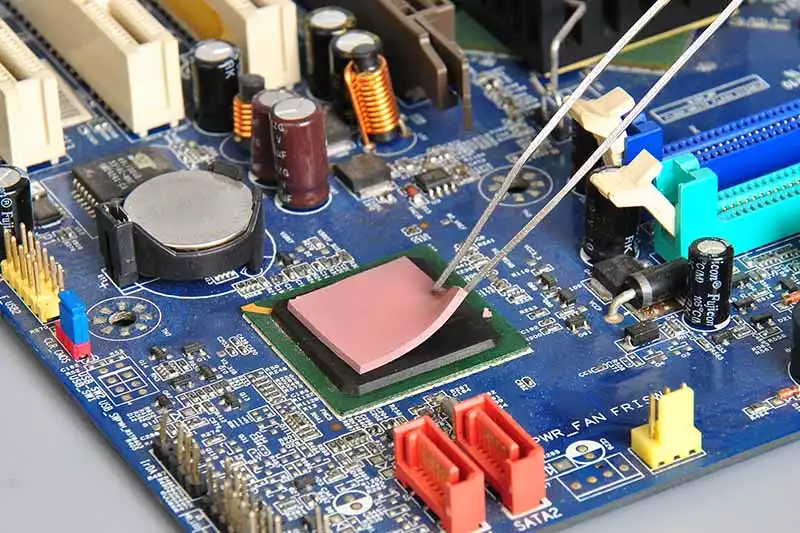
Thermal pads are compressible, pre-cut sheets made for gap filling around chipset, memory, and VRM zones.
· Easy installation
· Consistent thickness
· Lower conductivity than paste
For laptops needing quick maintenance, pads feel fuss-free. Yet when chasing better laptop thermal management, many brands now combine pads with Graphene heat dissipation for laptops to enhance lateral heat flow.
Metal Heat Pipes
Inside a sealed tube sits a working fluid. Heat hits the evaporator, turns liquid to vapor, then moves toward the condenser. A wick structure drives return flow via capillary action.
Phase change cycle
· Evaporation → Vapor travel
· Condensation → Liquid return
This heat transfer loop is efficient and durable. Still, it moves heat directionally. Pairing pipes with a graphene heat spreader boosts overall heat dissipation across laptops.
Graphene Layers
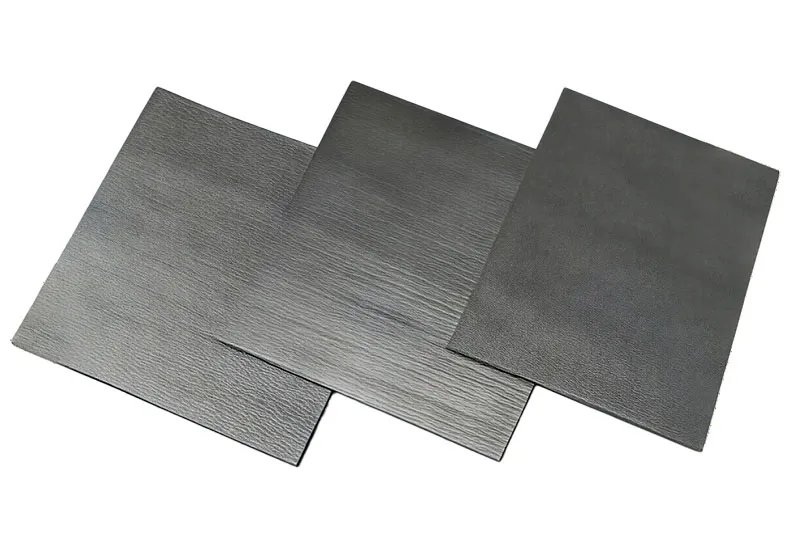
Graphene Layers are ultra-thin, almost single-atom sheets acting as a high-speed heat spreader. In Graphene heat dissipation for laptops, heat moves laterally across a thin film, reducing hotspots near the CPU and GPU.
The International Energy Agency’s 2025 materials efficiency outlook notes that advanced carbon materials like graphene are accelerating adoption in thermal management applications due to superior conductivity-to-weight ratios.
In practical laptop use:
· Spreads heat across the laptop chassis
· Enhances passive cooling
· Supports quieter fans
Brands such as Sheen Technology integrate Graphene heat dissipation for laptops into slim designs, balancing performance and portability. For modern laptop thermal management, graphene heat spreader solutions are no longer experimental—they’re becoming the smart upgrade path.
3 Reasons Graphene Beats Metal Cooling
Laptops heat up fast. Slim bodies, high performance, tight airflow—it’s a tough combo. That’s why Graphene heat dissipation for laptops is getting serious attention. By blending graphene, smart thermal management, and lightweight design, brands like Sheen Technology are reshaping laptop cooling with sharper heat transfer and longer device life.
Superior Heat Conductivity
When it comes to Graphene heat dissipation for laptops, the core advantage is simple: extreme thermal conductivity.
Key performance gains:
· Faster heat transfer
· Improved cooling efficiency
· Reduced hotspot buildup
At the material level
· Graphene forms a tightly bonded carbon lattice.
· This structure accelerates heat dissipation across the surface.
· Heat spreads before it can concentrate.
At the device level
· Internal thermal management becomes more stable.
· Fans cycle less aggressively.
· Overall system performance stays consistent under load.
At the user level
· Cooler keyboard surface
· Less thermal throttling
· Smoother gaming and rendering sessions
★ Result: steadier output without bulky copper plates.
“Advanced carbon-based materials are emerging as next-generation thermal interface solutions for compact electronics,” noted a 2025 materials outlook published by IDTechEx, highlighting graphene-enabled cooling in portable computing.
Sheen Technology integrates Graphene heat dissipation for laptops into ultra-thin modules that push heat outward fast, not sideways into sensitive chips.
Minimal Weight Impact
Metal cooling works, but it adds grams. In thin devices, grams matter.
· Lightweight material
· Lower device weight
· Slim form factor
With graphene, the math changes.
Structural advantages
· Atomic-level thickness
· High surface-area coverage
· Minimal mass reduction needed elsewhere
Design flexibility
· Supports thin design goals
· Boosts portability
· Keeps internal layout clean
For brands chasing portability, Graphene heat dissipation for laptops means better cooling without sacrificing mobility. Sheen Technology focuses on balancing cooling efficiency and carry comfort—no brick-like laptops.
Enhanced Durability
Heat cycles kill metal over time. Expansion. Contraction. Fatigue.
Graphene handles stress differently.
· Strong material strength
· Better wear resistance
· Long-term resilience
A closer look:
Chemical stability
· Resists corrosion
· Maintains structural integrity
Thermal cycling endurance
· Lower microfracture risk
· Stable lifespan across repeated heating
Device impact
· Improved device longevity
· Consistent thermal management year after year
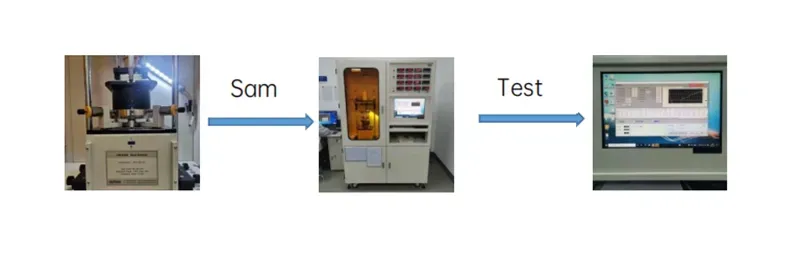
Sheen Technology Laboratory GSF75-03 Graphene Thermal Resistance Test Record:
1. Tested using the LW-9389 Thermal Conductivity Tester; reference standard: ASTM D5470.
2. Sample preparation: A 25.4mm x 25.4mm x 0.3mm sample is placed flat on the test platform.
3. Test method:
· Launch the software and select the calibration function; set parameters to 40 psi pressure and 80°C temperature, perform thickness zeroing, and set the duration to 15 minutes.
· Select the thermal resistance test mode for thermal pads; set the temperature to 80°C, initial pressure to 10 psi, pressure increment to 10 psi, and final pressure to 40 psi.
· Start the test and automatically obtain the results.
| Test Project | Test data | Pressure (psi) | |||
| Sample | 10 psi | 20 psi | 30 psi | 40psi | |
| Thermal resistance at 10–40 psi (°C·in²/W) @0.3 mm |
1 | 0.016 | 0.016 | 0.015 | 0.015 |
| 2 | 0.017 | 0.016 | 0.015 | 0.015 | |
| 3 | 0.016 | 0.016 | 0.015 | 0.015 | |
| average value | 0.016 | 0.016 | 0.015 | 0.015 | |
| Thermal resistance at 10–40 psi (°C·cm²/W) @0.3 mm |
1 | 0.106 | 0.100 | 0.095 | 0.094 |
| 2 | 0.108 | 0.101 | 0.095 | 0.096 | |
| 3 | 0.105 | 0.100 | 0.096 | 0.095 | |
| average value | 0.106 | 0.100 | 0.095 | 0.095 | |
That’s the quiet win of Graphene heat dissipation for laptops. Not just cooler today—cooler for the long haul. And with Sheen Technology refining this approach, laptop cooling is shifting from heavy metal plates to smart carbon engineering.
Copper vs. Graphene Heat Spreaders
Thin laptops are under pressure. Chips run hotter, batteries sit tighter, and users expect silent performance. That’s where Graphene heat dissipation for laptops enters the conversation, especially when compared with traditional copper cooling plates. Let’s break down how Cooling technology is evolving and what it means for real-world laptop cooling.
Copper Heat Spreaders
Copper has long been trusted in Laptop cooling because of its strong Thermal conductivity and stable Metal alloy structure. It handles Heat transfer reliably, but it comes with trade-offs in Weight and Density.
· High Thermal conductivity
· Proven Cooling technology
· Mature supply chain
· Solid mechanical strength
· Predictable Performance under load
· Easy integration with vapor chambers
Copper’s downside shows up clearly in ultra-thin machines pushing Graphene heat dissipation for laptops as a lighter option.
Performance Snapshot
| Material | Thermal Conductivity (W/m·K) | Density (g/cm³) | Typical Thickness (mm) |
| Copper | ~385–400 | 8.96 | 0.3–1.0 |
| Aluminum | ~205 | 2.70 | 0.4–1.2 |
When brands like Sheen Technology evaluate copper for Graphene heat dissipation for laptops alternatives, they typically assess:
▪ Material stack thickness
▪ Total cooling module mass
▪ Long-term Performance stability
Copper still works well in gaming rigs where space isn’t tight. In slim notebooks chasing graphene laptop cooling and thinner builds, copper can feel a bit heavy—literally.
Graphene Heat Spreaders
Graphene heat dissipation for laptops shifts the focus from bulk metal to Nanomaterial engineering. Built on a layered Carbon structure, graphene films deliver High thermal conductivity in-plane while staying Lightweight and ultra-thin.
Here’s how graphene cooling solutions are typically structured:
Material Core
· Single or multi-layer Thin film graphene
· Reinforced composite backing
Functional Layer
· Directed Thermal management channels
· Surface-treated contact zones
Device Integration
· CPU/GPU hot spot mapping
· Battery-side heat buffering
This approach supports:
· Lower internal temperature spikes
· Faster lateral heat spreading
· Reduced fan noise
Short take? Less mass. More speed in heat spreading. Better comfort on your lap.
For manufacturers focused on Graphene heat dissipation for laptops, the shift means rethinking layout:
· Map real heat sources.
· Apply graphene film directly over hotspots.
· Pair with vapor chamber or micro-fan if needed.
That layered method improves Enhanced performance without adding thickness. It’s why graphene thermal management keeps showing up in ultrabooks and compact workstations.
Sheen Technology continues refining graphene heat solutions that balance Advanced cooling with practical manufacturing. In ultra-slim devices, Graphene heat dissipation for laptops isn’t hype—it’s a serious path toward lighter builds and steadier performance under pressure.
Download Technical Specifications for Graphene Laptop Thermal Solutions
Hot Spots Slowing You Down? Graphene to the Rescue
Laptops get hot. Not just warm—hot enough to choke performance. That’s where Graphene heat dissipation for laptops steps in. By improving heat flow and reducing thermal buildup, graphene cooling solutions help machines stay fast under pressure. Let’s break down how laptop heat control works and why graphene-based laptop cooling is gaining traction.
Identifying Laptop Hot Spot Zones
When optimizing Graphene heat dissipation for laptops, spotting heat troublemakers is the starting point.
Core Processing Areas
· CPU performance drops when thermal throttling kicks in.
· GPU efficiency suffers during gaming or rendering spikes.
· VRMs quietly overheat, destabilizing power delivery.
Power and Storage Sections
· Battery cells:Rising internal resistance,Uneven heat distribution.
· SSD modules:Limited airflow,Trapped warmth near internal components.
Diagnostic Methods
· Thermal imaging scans reveal component hotspots.
· Built-in temperature sensors log peak loads.
Advanced thermal mapping with diagnostic tools confirms where graphene laptop heat dissipation layers should sit.
Pinpointing these zones ensures graphene heat spreader placement actually solves the problem, not just masks it.
Graphene Layer Application Techniques
Applying Graphene heat dissipation for laptops isn’t guesswork. It blends smart material integration with precise manufacturing process control.
• Direct graphene coating over processors
• Ultra-thin film application beneath heat pipes
• Reinforced substrate bonding to aluminum chassis
In practice, engineers often:
· Clean the surface for proper thermal interface contact.
· Use controlled deposition methods to maintain even thickness.
· Test lateral heat movement across the graphene sheet.
The result? Heat spreads sideways instead of stacking up in one angry hotspot.
Performance Gains in Intensive Tasks
With Graphene heat dissipation for laptops, improvements show up where it counts.
Sustained Workloads
Gaming sessions
· Higher stable frame rates
· Fewer sudden clock drops
Video rendering
· Improved cooling effectiveness
· Stronger system stability
Measurable Output
· Better benchmark scores
· Consistent intensive computing speeds
· Reduced frequency of thermal throttling
Graphene cooling for laptops keeps silicon in its comfort zone. That steadiness translates to smoother multitasking, longer peak CPU performance, and stronger GPU efficiency. In short, Graphene heat dissipation for laptops helps your machine stay cool—and keep its cool—when the workload gets real.
5 Surprising Facts About Graphene Heat Dissipation for Laptops
Laptops heat up fast when you push them hard. That’s why Graphene heat dissipation for laptops is getting so much buzz. By combining graphene, heat, and dissipation for modern laptops, brands are rethinking cooling. Here’s what makes this tech a real game changer.
Instant Heat Dissipation No Matter the Load
When a laptop hits a heavy thermal load, spikes can hurt device performance. With Graphene heat dissipation for laptops, heat moves through high-speed heat transfer channels almost instantly.
· Rapid temperature control during gaming
· Stable system stability under rendering
· Sustained peak performance in daily work
Graphene laptop cooling works like this:
· Heat forms at the CPU/GPU.
· The graphene layer triggers rapid cooling.
· Heat spreads outward, avoiding buildup.
That’s why graphene cooling for laptops feels smooth even when workloads jump.
High Thermal Conductivity performance
In material science, graphene stands out for extreme high conductivity. Its thermal performance changes how heat conduction works inside slim machines.
Sheen Technology Graphene Thermal pad performance properties:
| Properties | Unit | GSF90-03 Graphene Thermal Pad | GSF75-03 Graphene Thermal Pad | Test Method |
| Color | - | Black | Black | Visual |
| Thermal Conductivity | W/m·K | ≥90 | ≥75 | ASTM E1461 |
| Thermal Resistance (@40psi) | ℃*in2/W | ≤0.013 | ≤0.016 | ASTM D5470 |
| Thickness | mm | 0.27~0.33 | 0.27~0.33 | ASTM D374 |
| Density | g/cm³ | 0.6~0.9 | 0.6~0.9 | ASTM D792 |
| Compression Rebound Rate | % | ≥55 | ≥60 | ASTM D575 |
| Tensile Strength | Mpa | ≥0.03 | ≥0.03 | ASTM D412 |
| Oil Bleeding Rate | % | ≤3 | ≤3 | / |
| Application Temperature | ℃ | -40~150 | -40~150 | / |
| RoHS | - | PASS | PASS | IEC 62321 |
| Halogen | - | PASS | PASS | EN 14582 |
| REACH | - | PASS | PASS | EN 14372 |
With high thermal conductivity performance, Graphene heat dissipation for laptops boosts real-world thermal efficiency far beyond metals. That’s serious graphene thermal management power.
Bi-Directional Heat Spreading Capability
Hot spots kill comfort. Graphene fixes that through smart heat distribution and multi-directional transfer.
➤ Reduces hot spot mitigation issues
➤ Improves thermal uniformity
➤ Enhances spreading efficiency
Inside a laptop cooling stack:
· Surface Layer:Graphene sheet,Enhanced thermal pathways.
· Core Layer:CPU/GPU contact zone,Balanced isotropic heat flow.
This graphene heat spreading keeps internal temps balanced, making Graphene heat dissipation for laptops ideal for power users.
Compatibility with Thin Form Factors
Ultra-slim machines face real space constraints. Traditional cooling eats room. Graphene doesn’t.
It fits into compact electronics, supports form factor optimization, and works with ultra-thin devices without bulky pipes. Laptop heat dissipation graphene layers measure in microns, so design teams can keep that slim profile users love.
Brands like Sheen Technology integrate graphene cooling solutions directly into device integration workflows, keeping both airflow and aesthetics intact.
Eco-Friendly Production Advantages
Cooling shouldn’t cost the planet. Compared with copper mining, graphene supports sustainable manufacturing and better resource efficiency.
· Lower raw material demand
· Reduced environmental impact
· Scalable production methods
· Smaller carbon reduced footprint
For companies focused on green technology and eco-conscious design, Graphene heat dissipation for laptops checks both performance and sustainability boxes.
That’s why innovators like Sheen Technology continue pushing graphene-based thermal solutions into next-gen laptops.
【Request a Custom Quote】Share your CPU/GPU heat load, thickness target, cooling architecture, and reliability requirements. We can help evaluate the right graphene thermal stack for your design.
· Lower raw material demand
· Reduced environmental impact
· Scalable production methods
· Smaller carbon reduced footprint
For companies focused on green technology and eco-conscious design, Graphene heat dissipation for laptops checks both performance and sustainability boxes.
That’s why innovators like Sheen Technology continue pushing graphene-based thermal solutions into next-gen laptops.
【Request a Custom Quote】Share your CPU/GPU heat load, thickness target, cooling architecture, and reliability requirements. We can help evaluate the right graphene thermal stack for your design.
Sheen Thermal
Dongguan Sheen Electronic Technology Co., Ltd · Founded in 2008
Manufacturer of thermal interface materials and silicone foam for automotive electronics, energy storage, power electronics, communications and consumer electronics.
Certified
- ISO 9001:2015
- ISO 14001:2015
- IATF 16949:2016
What we supply
- Thermal conductivity Up to 90 W/m·K
- Thickness 0.3–10.0 mm
- Custom & samples Die-cut to drawing, 3–7 days